
Access your proof of balance and transactions report
Get your documents from Online Banking or the Westpac App anytime.
What is a proof of balance and transactions report?
Whether you're applying for a home loan or government support, chances are you’ll need to provide documents that confirm your account balance or transactions.
Proof of balance is a statement showing your current account balance.
Transactions report shows your transactions for a specific time. Choose 30, 90 or 120 days, set a custom range (up to a year) or on eligible accounts, view activity since your last statement.
Both documents include your
- Name and address
- Account number
- Current balance
- Current date
- PDF formatting on Westpac letterhead.

Convenient
View and download your proof of balance and transactions report anywhere, anytime.

More secure

Near real-time
Get the most recent documentation with your account data updated almost in real-time.
When to use a proof of balance?
Examples include:
Applying for a home loan
Showing proof of your savings when you apply for a home loan.
Confirming details with Centrelink
Showing proof of your current account balance for your Centrelink application.
When to use your transactions report?
Examples include:
Applying for a credit card
Demonstrating how you manage repayments through your transaction history.
Completing your tax return
Documenting any interest earned or expenses from the past financial year.
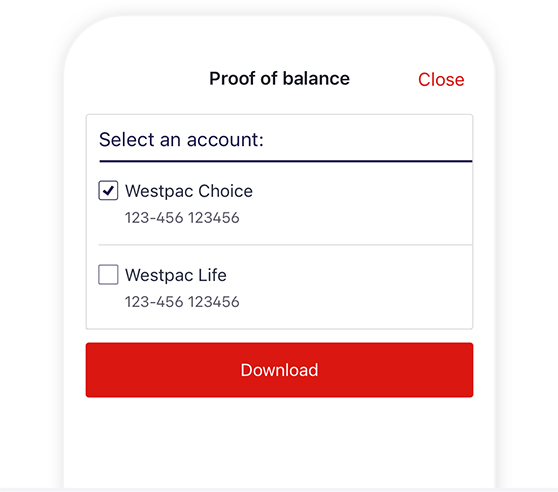
How to download your proof of balance report
In the Westpac App
Make sure you have the latest version of the app.
- Search Proof of balance in the Smart Search bar
- Select the account and tap Download
In Online Banking
- Go to Overview > Proof of balance and transactions
- Choose an account and select Create report
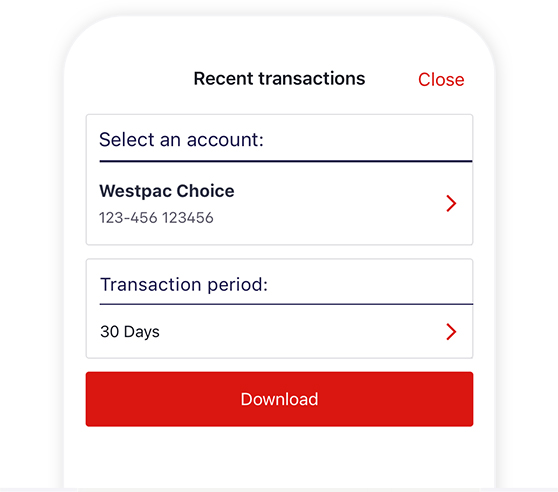
How to download your transactions report
In the Westpac App
Make sure you have the latest version of the app.
- Search Download transactions report in the Smart Search bar
- Select the account and transaction period – 30, 90, or 120 days – or select a custom range (up to 12 months). For eligible accounts, you can also view activity since your last statement
- Tap Download.
In Online Banking
- Go to Overview > Proof of balance and transactions
- Choose an account and date range and select Create report.


Things you should know
Read the Westpac Online Banking Terms and Conditions (PDF 633KB) at westpac.com.au before making a decision and consider whether the product is right for you.
Westpac Mobile Banking applications are only available for use by Westpac Australia customers. Internet connection is needed to access Westpac Online Banking and the Westpac App. Normal mobile data charges apply.
iPhone, iPad, iPod touch and Apple Watch are trademarks of Apple Inc., registered in the U.S. and other countries. App Store is a Service mark of Apple Inc.
Android, Google Play and the Google Play logo are trademarks of Google LLC.
This information is general in nature and has been prepared without taking your objectives, needs and overall financial situation into account. For this reason, you should consider the appropriateness for the information to your own circumstances and, if necessary, seek appropriate professional advice.