
Past Scams & Alerts

Staying smart about scams
Scammers are constantly evolving by using different tactics.
Learn to better safeguard your personal and financial information by going through these examples of previous scams and security alerts.
June 2025 – SMS Scams
Be alert to scam messages posing as Westpac
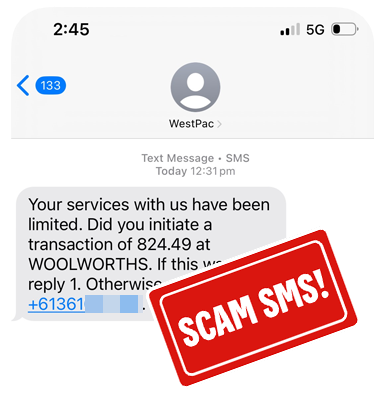
This SMS claims to be sent from Westpac, requesting confirmation of a payment but is a scam. It also includes an amount and retailer to prompt you to act urgently, as well as a threat stating your services have been limited.
Be aware - Scammers use impersonation tactics, such as Caller ID spoofing, to try and convince you this is a trusted message. Your phone will automatically group this scam SMS in with legitimate messages sent from the sender name "Westpac".
If you call the number in this message, you will not be speaking with Westpac. It will be a scammer. They are likely to request your personal or banking information. Do not provide any of this information. Just hang up.
You should always call Westpac on a number found on our contact us page.
Remember - If you have received an email, SMS, phone number or a request that you have identified as potentially fraudulent or a scam account related to Westpac, it’s always a good idea to report this through to us, before deleting it from your inbox and deleted items, or your device.
Forward a copy to hoax@westpac.com.au or 0497 132 032.
May 2025 – Email Scams
Be alert to scam emails posing as Westpac
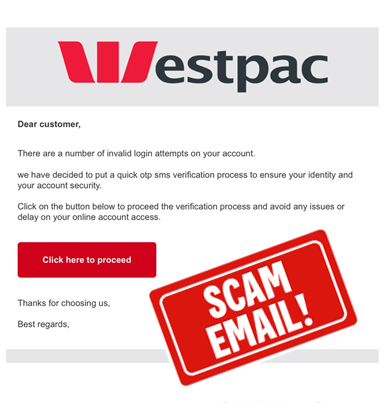
This scam email, claiming to be from Westpac, states there were failed logins attempted on your profile. It encourages you to click a link to resolve the issue.
Scammers often use imagery or language similar to legitimate organisations, making subtle changes—such as the actual destination of buttons or links—to disguise their intent and make the email appear as if it could be from Westpac.
Do not click on this link.
If you hover the mouse cursor over the button, you will see the link does not lead you to a Westpac domain - westpac.com.au, instead a phishing website designed to capture your sign in details.
We will never ask you to click a link, or button, sent to you via an email or through SMS. We will always ask you to visit our website or use the app.
Remember - If you have received an email, SMS, phone number or a request that you have identified as potentially fraudulent or a scam account related to Westpac, it’s always a good idea to report this through to us, before deleting it from your inbox and deleted items, or your device.
Forward a copy to hoax@westpac.com.au or 0497 132 032.

April 2025 – Email Scams
Be alert to scams emails posing as Westpac
This scam email, claiming to be from Westpac, states a new payment has been made. The email contains falsified payment details, to encourage you to call the number included within the email.
Do not call the number contained in the email.
If you call the phone number, it may impersonate similar hold music or voice overs of those heard on the legitimate Westpac phone numbers.
Once you speak with an operator, they may request you download software to access your device. Common remote access software applications include Anydesk, Team Viewer or Zoho, but there are also many others.
After downloading the software, their connection name may impersonate Westpac. If you establish a connection with this third party, it allows them the ability to remotely control your device - indicators of an active session includes your mouse moving or browsers opening without you performing this function.
Remember, Westpac will never ask to connect to your device through remote access software. It will be highly likely you are engaging in a scam if you do so.
Remember - If you have received an email, SMS, phone number or a request that you have identified as potentially fraudulent or a scam account related to Westpac, it’s always a good idea to report this through to us, before deleting it from your inbox and deleted items, or your device.
Forward a copy to hoax@westpac.com.au or 0497 132 032.

March 2025 – Impersonation Scams
Be alert to scams during severe weather events
Scammers often attempt to take advantage of severe weather events such as ex-Tropical Cyclone Alfred, or other topical situations to lure you into believing their requests via email, SMS, social media messages or phone calls are genuine. These are all an attempt to steal your personal and financial information.
They pretend to offer financial aid, or exploit the generosity of members of the public wanting to make a donation, to those in impacted areas.
If you’re contacted by us, even our Fraud team, we will never ask you to complete any of the following actions:
- Share your Online Banking Password
- Share an Online Banking Security Code (sent via SMS, displayed on a Token or from Security Code via the App)
- Ask you to install software that allows us to connect to your device
- Sign into your Online Banking with remote access software on your device.
It’s likely a scam caller if you are asked to share your Online Banking Passwords, Security Codes or PINs.
Remember - If you have received an email, SMS, phone call or other request that you have identified as potentially fraudulent or a scam, it’s always a good idea to report this through to us, before deleting it from your inbox and deleted items, or your device.
Forward a copy to hoax@westpac.com.au or 0497 132 032.
October 2024 – Impersonation Scams
Be alert to scam calls impersonating Westpac
Scammers often attempt to take advantage of bank outages, natural disasters and other topical situations to lure you into believing their calls are genuine, in an attempt to steal your personal and financial information.
If you’re contacted by us, even our Fraud team, we will never ask you to complete any of the following actions:
- Share your Online Banking Password
- Share an Online Banking Security Code (sent via SMS, displayed on a Token or from Security Code via the App)
- Ask you to install software that allows us to connect to your device
- Sign into your Online Banking with remote access software on your device.
It’s likely a scam caller if you are asked to share your Online Banking Passwords, Security Codes or PINs.
Remember - If you have received an email, SMS, phone call or other request that you have identified as potentially fraudulent or a scam, it’s always a good idea to report this through to us, before deleting it from your inbox and deleted items, or your device.
Forward a copy to hoax@westpac.com.au or 0497 132 032.

October 2024 - Email Scams
This scam email, claiming to be from Westpac, states a new payment has been made. The email contains falsified payment details, to encourage you to call the number included within the email.
Do not call the number contained in the email.
If you call the phone number, it may impersonate similar hold music or voice overs of those heard on the legitimate Westpac phone numbers.
Once you speak with an operator, they may request you download software to access your device. Common remote access software applications include Anydesk, Team Viewer or Zoho, but there are also many others.
After downloading the software, their connection name may impersonate Westpac. If you establish a connection with this third party, it allows them the ability to remotely control your device - indicators of an active session includes your mouse moving or browsers opening without you performing this function.
Remember, Westpac will never ask to connect to your device through remote access software. It will be highly likely you are engaging in a scam if you do so.
Remember - If you have received an email, SMS, phone number or a request that you have identified as potentially fraudulent or a scam account related to Westpac, it’s always a good idea to report this through to us, before deleting it from your inbox and deleted items, or your device.
Forward a copy to hoax@westpac.com.au or 0497 132 032.
October 2024 - Impersonation Scams
Be alert to fake Westpac websites with Remote Access Software
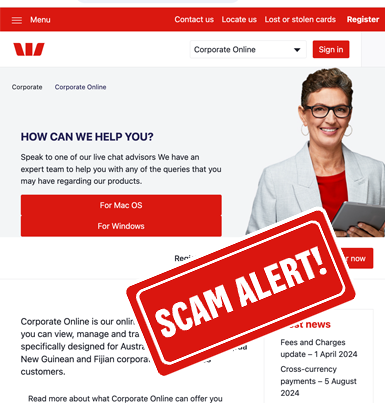
This fake website, visually, uses images and colours that may seem consistent with those you see on our genuine Westpac website, however it is not legitimate. The information on this site contains links to software, such as Anydesk or Team Viewer, that can allow a third party to remotely access your device.
Remember, the real Westpac website is westpac.com.au. There are no other versions of this domain name.
A domain name is like a street address for the internet - if you use the wrong address, you will not be visiting the right place (or in this case, website).
After downloading the software, the third party who directed you to this phishing website will then request access to your device. Their connection name may even impersonate Westpac. The application is a form of remote access software. When a user establishes a connection with a third party, it allows them the ability to remotely control your device - indicators of an active session includes your mouse moving or browsers opening without you performing this function.
NEVER download remote access software and share access to your Online Banking.
Remember - If you have received an email, SMS, phone number or a request that you have identified as potentially fraudulent or a scam account related to Westpac, it’s always a good idea to report this through to us, before deleting it from your inbox and deleted items, or your device.
Forward a copy to hoax@westpac.com.au or 0497 132 032.
September 2024 - Email Scams
Be alert to phishing emails
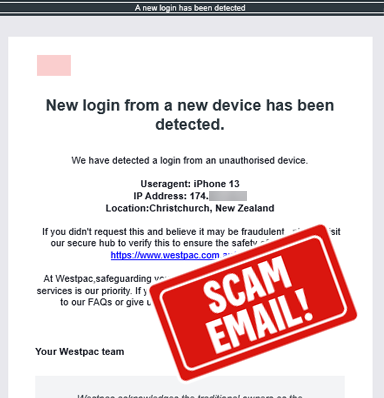
This scam email, claiming to be from Westpac, states we've detected a login from a new device to your Online Banking.
Scammers often use genuine wording from organisations in an attempt to appear legitimate, but make small changes to links or phone numbers to avoid recipients identifying the scam.
Do not click on this link.
The text within the link suggests that you are being taken to the Westpac Security Hub, however upon hovering over the link, you can see the actual website does not belong to Westpac.
Remember - If you have received an email, SMS or other request that you have identified as potentially fraudulent or a scam account, it’s always a good idea to report this through to us, before deleting it from your inbox and deleted items, or your device.
Forward a copy to hoax@westpac.com.au or 0497 132 032.
September 2024 - Bond Scams
Be alert to fake bonds
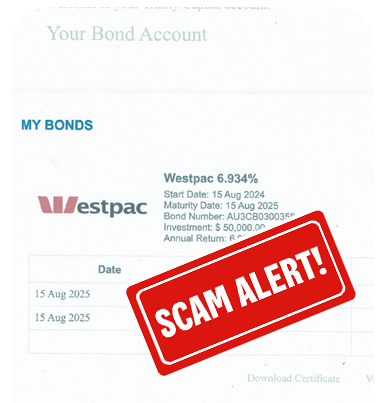
Scammers often impersonate well known financial service companies to gain your trust and confidence when looking for your next investment opportunity. Scammers commonly use legitimate company information to create professional looking websites or documentation such as certificates of authentication. They may even provide 'advisors' who are readily available to guide you through financial choices to lure you into investing.
We've been alerted to scammers posing as representatives of Trinity Asset & Commercial Capital communicating to potential investors through a fake website that requests your contact details, or an unexpected call or email.
Always take precautions when establishing a new investment, including completing searches to validate ABNs, and performing checks of the ASIC Professional register.
Find out more about Investment Scams. If you have participated in the activity described, and you have made payments, contact us immediately.
September 2024 - Term Deposit Scams
Be alert to fake Westpac Term Deposit offers
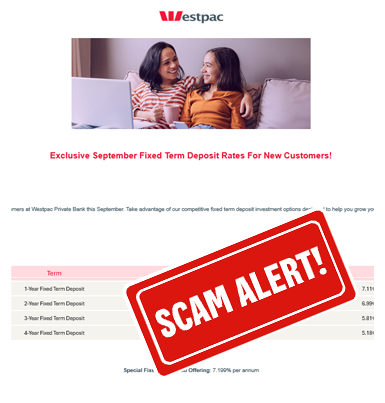
We've been made aware of fake Term Deposit emails from representatives claiming to be from Westpac.
Remember, the safest way to find out our Term Deposit rates is by visiting the information on our website, speaking with a Westpac representative in branch, an established relationship manager or through our contact centre.
Be cautious to investment websites that request you to enter contact details to receive a call back with information.
Find out more about Investment Scams. If you have participated in the activity described, and you have made payments, contact us immediately.

September 2024 - Fake Websites
Be alert to fake Westpac websites
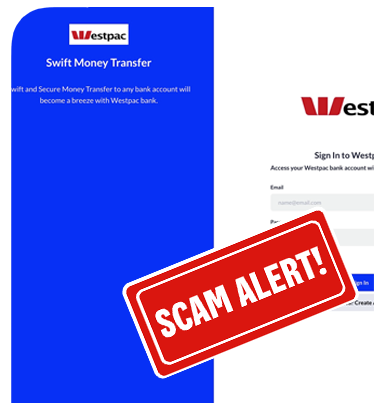
Scammers often use genuine wording from organisations in an attempt to appear legitimate. This website, posing as the "Westpac Bank", is not legitimate. The site contains details about banking products but is ultimately designed to capture your personal and financial information.
Remember, the real Westpac website is westpac.com.au and there are no other versions of this domain name.
A domain name is like a street address for the internet - if you use an alternative address it's unlikely you will be visiting the right place (or in this case, website).
Find out more about phishing. If you have participated in the activity described, and you have made payments, contact us immediately.
Remember - If you have received an email, SMS or other request that you have identified as potentially fraudulent or a scam account, it’s always a good idea to report this through to us, before deleting it from your inbox and deleted items or your device.
Forward a copy to hoax@westpac.com.au or 0497 132 032.
August 2024 - Investment Scams
Be alert to fake Westpac websites
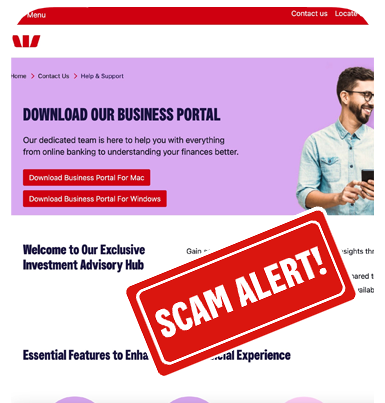
This fake website, visually, uses images and colours that may seem consistent with those you might see on our genuine Westpac website, however it is not legitimate. The information on this site contains details specifically about investing, as well as support services.
Remember, the real Westpac website is westpac.com.au and there are no other versions of this domain name.
A domain name is like a street address for the internet - if you use an alternative address it's unlikely you will be visiting the right place (or in this case, website).
After downloading the software, the fake advisor/third party will then request access to your device. The application is a form of remote access software. When a user establishes a connection with a third party, it allows them the ability to remotely control your device. This includes the information you see on screen.
NEVER download remote access software and share access to your Online Banking.
Find out more about Investment Scams. If you have participated in the activity described, and you have made payments, contact us immediately.
August 2024 - SMS Scams
Be alert to scam texts regarding Medicare refunds
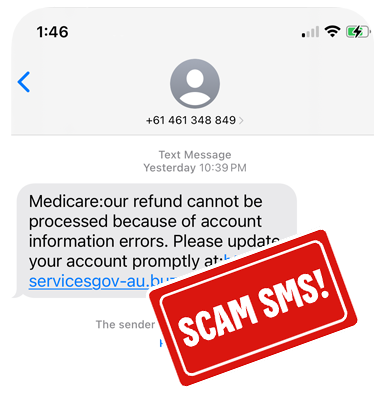
This scam SMS, claims to be sent from Medicare, advising a refund cannot be processed.
Be aware - If you click the link in this SMS, you will be taken to a phishing website which attempts to steal your personal and banking information.
Always use genuine apps or websites to validate the information being provided, particularly when emails or SMSs advise they are for refunds. Remember, never sign in to your online banking, or share your credit card details via a link received in an email or SMS.
Remember - If you have received an email, SMS or other request that you have identified as potentially fraudulent or a scam account, it’s always a good idea to report this through to us, before deleting it from your inbox and deleted items or your device.
Forward a copy to hoax@westpac.com.au or 0497 132 032.
August 2024 - Job Scams
Be alert to scam texts with fake job ads
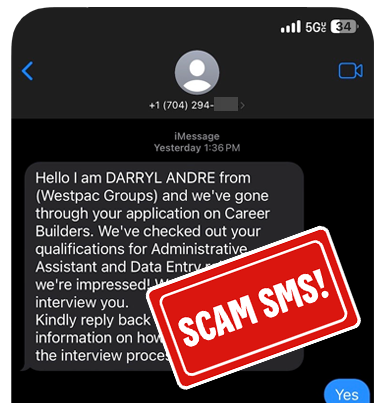
This scam SMS, claims to be sent from a representative of the Westpac Group, offering a fake role.
Be aware - These messages are not from a representative of the Westpac Group, rather a scammer attempting to capture your personal and banking information. To learn more about applying for roles at Westpac, visit our Careers information page.
Scammers use impersonation tactics, to try and convince you they are genuine. As a part of this scam you will be invited to a video interview through various well known applications like Microsoft Teams, ZOOM or Skype.
Once you have completed an interview, you may receive a letter of offer.
Learn more about job scams
July 2024 - SMS Scams
Be alert to scam texts hiding in genuine message conversations
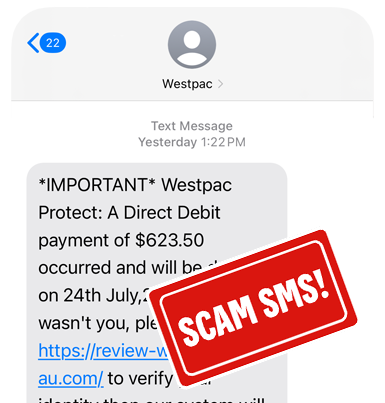
This scam SMS, claiming to be sent from Westpac, states a direct debit payment will occur. It also includes a date to prompt you to act urgently.
Be aware - The link in this SMS will not take you to a Westpac website. Never use a link received in an email or SMS to sign into your banking. Always type westpac.com.au into your browser, or use the App, to securely access your banking.
Scammers use impersonation tactics, such as Caller ID spoofing, to try and convince you this is a trusted message. Your phone will automatically group this scam SMS in with legitimate messages sent from the sender name "Westpac".
Never share any Online Banking Security Codes with a third party, not even callers who claim to be Westpac. We will never ask you for this information.
Remember - If you have received an email, SMS or other request that you have identified as potentially fraudulent or a scam account, it’s always a good idea to report this through to us, before deleting it from your inbox and deleted items or your device.
Forward a copy to hoax@westpac.com.au or 0497 132 032.

June 2024 - Fake Receipt Scams
Be wary of fake receipts
We've received varied reports of customers claiming to have received a Westpac receipt for items purchased through an online marketplace.
These receipts are given to a seller as proof of payment to collect an item.
Be aware - Receipts, whether digital or a printed receipt, could be manipulated to appear consistent with the claimed transaction. Your primary confirmation for receipt of payment should always be by signing into Online Banking or the App, and verifying the funds have been received in to your account.
If you cannot validate the money is in your account, and the purchaser produces a receipt, be wary as this may be a scam. If the payment is delayed, do not part with the item until you have confirmed the deposit has been received into your account.
Remember - If you have received an email, SMS or other request that you have identified as potentially fraudulent or a scam account, it’s always a good idea to report this through to us, before deleting it from your inbox and deleted items or your device.
Forward a copy to hoax@westpac.com.au or 0497 132 032.
March 2024 - Email Scams
Email Subject Lines may vary
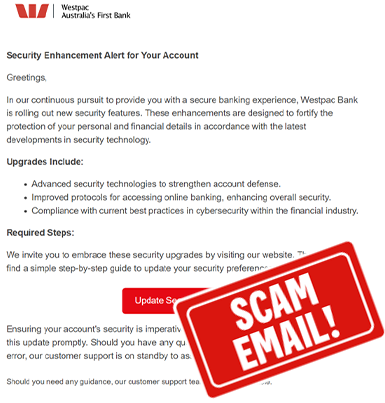
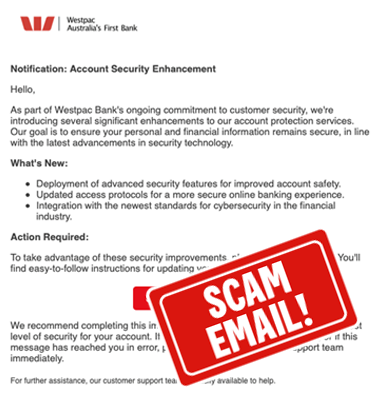
We've received varied reports of this particular scam email, with slight changes to the wording, however the body of the email is consistent in appearance. The email is focused on Security Upgrades or new enhancements within our banking platforms, and requests you click a link to implement the features, update security settings, or secure your account.
We will never ask you to click a link to access to our new security features.
Be aware - The link in this email will take you to a phishing website to capture your personal and banking information. Never use a link received in an email or SMS to sign into your banking. Always type westpac.com.au into your browser, or use the App, to securely access your banking.
Remember - If you have received an email, SMS or other request that you have identified as potentially fraudulent or a scam account, it’s always a good idea to report this through to us, before deleting it from your inbox and deleted items or your device.
Forward a copy to hoax@westpac.com.au or 0497 132 032.
March 2024 - Email Scams
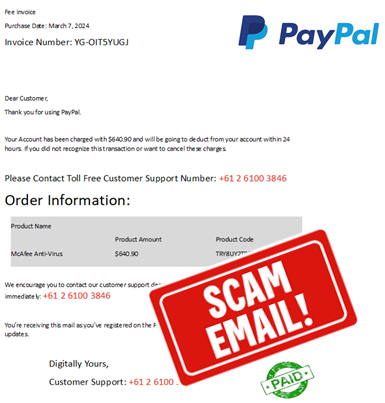
Email Subject Line: #!**TRANSICTION**!#
This scam email claiming to be sent from PayPal, indicates an amount has been charged to your account. To prevent this from occurring, you need to contact them on the phone number provided (in the email).
Be aware - The phone number in this email is not listed on PayPal's website as a contact number. To contact PayPal always use the options listed at paypal.com.au/contact-us
Scammers use impersonation tactics, such as phishing emails posing as reputable companies, to try and convince you this is a trusted message.
Customers have reported they were prompted to download Remote Access software to their device, (applications such as TeamViewer, AnyDesk etc.) to aid in being refunded alleged debits.
Never provide access or control of your device to a third party. Some indications of someone else controlling your device could be seeing your mouse move on screen, applications being opened or closed etc, without you performing these actions. It's important you do not access your Online Banking if someone has control of your device or share Security Codes with a third party. Your Security Codes help keep you safe from unauthorised transactions.
Remember - If you have received an email, SMS or other request that you have identified as potentially fraudulent or a scam account, it’s always a good idea to report this through to us, before deleting it from your inbox and deleted items or your device.
Forward a copy to hoax@westpac.com.au or 0497 132 032.
February 2024 - SMS Scams
Be alert to scam texts hiding in genuine message conversations
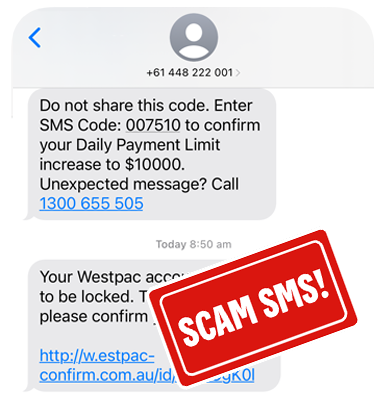
This scam SMS, claiming to be sent from our Westpac Protect™ SMS Code number, states your account access has been locked.
Be aware - The link in this SMS will not take you to a Westpac website. Never use a link received in an email or SMS to sign into your banking. Always type westpac.com.au into your browser, or use the App, to securely access your banking.
Scammers use impersonation tactics, such as Caller ID spoofing, to try and convince you this is a trusted message. Your phone will automatically group this scam SMS in with legitimate messages sent from the same number.
Never share any Online Banking Security Codes with a third party, not even callers who claim to be Westpac. We will never ask you for this information.
Remember - If you have received an email, SMS or other request that you have identified as potentially fraudulent or a scam account, it’s always a good idea to report this through to us, before deleting it from your inbox and deleted items or your device.
Forward a copy to hoax@westpac.com.au or 0497 132 032.
February 2024 - Scam Alert
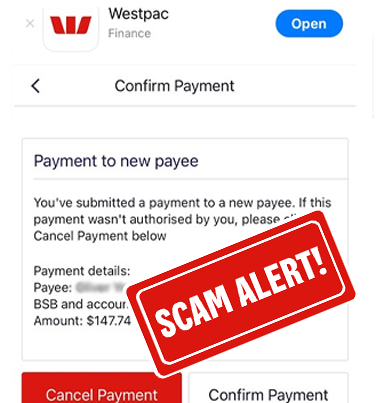
Be alert to unexpected messages about new payments
A scam SMS, claiming to be from Westpac, states a payment from a new device has been made. This message provides a link to a payment confirmation screen.
If you click the "Cancel Payment" option on this screen, you will be prompted to enter a Security Code to confirm this request. If you enter your Security Code, you will authorise a fraudulent payment. Do not enter the Security Code.
We will never ask you to click a link or enter a Security Code to cancel a payment.
Be aware - The link in this SMS will not take you to a Westpac website. Never use a link received in an email or SMS to sign into your banking. Always type westpac.com.au into your browser, or use the App, to securely access your banking.
Never share any Online Banking Security Codes with a third party, not even callers who claim to be Westpac. We will never ask you for this information.
Remember - If you have received an email, SMS or other request that you have identified as potentially fraudulent or a scam account, it’s always a good idea to report this through to us, before deleting it from your inbox and deleted items or your device.
Forward a copy to hoax@westpac.com.au or 0497 132 032.
December 2023 - Phishing Email
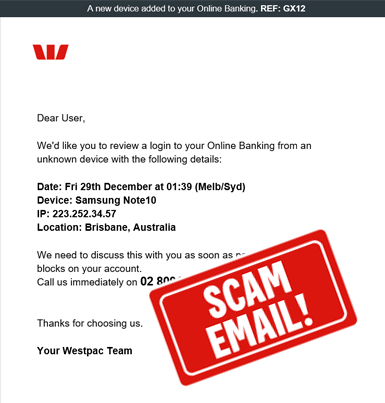
Email Subject Line: A new device added to your Online Banking
This scam email, claiming to be from Westpac, states we'd like you to review a device that has accessed your Online Banking.
Scammers often use genuine wording from organisations in an attempt to appear legitimate, but make small changes to links or phone numbers to avoid recipients identifying the scam.
Be aware - If you call the number in this message, you will not be speaking with Westpac. It will be a scammer. They are likely to request your personal or banking information. Do not provide any of this information. Just hang up.
Never share any Online Banking Security Codes with a third party, not even callers who claim to be Westpac. We will never ask you for this information.
Remember - If you have received an email, SMS or other request that you have identified as potentially fraudulent or a scam account, it’s always a good idea to report this through to us, before deleting it from your inbox and deleted items or your device.
Forward a copy to hoax@westpac.com.au or 0497 132 032.
December 2023 - Phishing Email
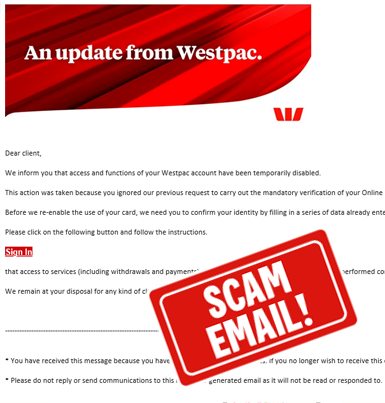
Email Subject Line: Protection
This scam email, claiming to be from Westpac, states your account has been temporarily disabled.
The email requests that you click on a link to sign in and verify your details, however if you click the link you will be taken to a phishing website. The fraudulent website requests your personal and banking information.
Do not click the link in this email. We will never ask you to click a link sent in an email or SMS to verify your identity.
Remember - If you have received an email, SMS or other request that you have identified as potentially fraudulent or a scam account, it’s always a good idea to report this through to us, before deleting it from your inbox and deleted items or your device.
Forward a copy to hoax@westpac.com.au or 0497 132 032.
November 2023 - SMS Scams
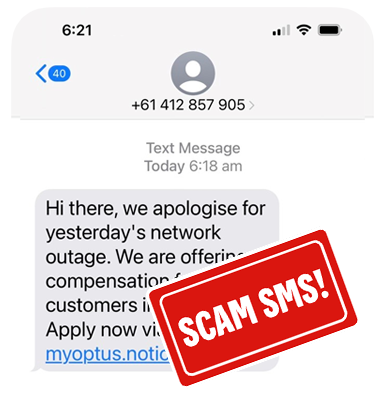
Be alert to unexpected scam messages.
This scam SMS claims to be associated with the telco network outage on the 08/11/2023. Scammers often attempt to take advantage of widespread outages, natural disasters and other topical situations to steal your personal and financial information.
Be aware - If you click the link in this SMS, you will be taken to a phishing website which attempts to steal your personal and banking information.
Please be alert to this and always use genuine apps or websites to validate the information being provided. Remember, never sign in to your online banking via a link received in an email or SMS.
Remember - If you have received an email, SMS or other request that you have identified as potentially fraudulent or a scam account, it’s always a good idea to report this through to us, before deleting it from your inbox and deleted items or your device.
Forward a copy to hoax@westpac.com.au or 0497 132 032.
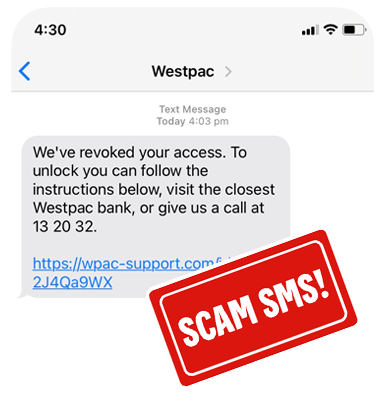
October 2023 - SMS Scams
Be alert to unexpected messages posing as Westpac.
This scam SMS claims your access has been revoked. Scammers often use genuine information about an organisation to create some legitimacy in their messages, but make small changes to links or phone numbers to avoid recipients identifying the scam.
Be aware - The phone number in this SMS is for Westpac, however the link will not take you to a Westpac website. Never use a link received in an email or to sign into your banking. Always type westpac.com.au into your browser, or use the App, to securely access your banking.
Remember - If you have received an email, SMS or other request that you have identified as potentially fraudulent or a scam account, it’s always a good idea to report this through to us, before deleting it from your inbox and deleted items or your device.
Forward a copy to hoax@westpac.com.au or 0497 132 032.
September 2023 - Scam Awareness Warning
Scammers targeting seniors with fake seniors discount card.
The Australian Competition and Consumer Commission's (ACCC) are warning Australians to beware of fake websites offering a seniors discount card.
These fake/phishing websites pretend to be officially approved providers, stating you can get membership by paying an application fee. Or you may get a phone call from someone offering you a seniors discount card, but requesting payment. You should always ask yourself if a caller could be fake.
There is no fee to apply for a seniors card.
The ACCC reminds Australians to "never click links in messages to log onto Government online services" and remember there is no fee for apply for a seniors card.
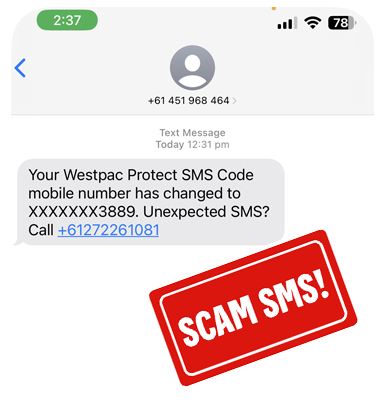
August 2023 - SMS Scams
Be alert to unexpected SMS Code change messages.
This scam SMS claims your Westpac Protect SMS Code has changed. Scammers often use genuine wording from organisations in an attempt to appear legitimate, but make small changes to links or phone numbers to avoid recipients identifying the scam.
Be aware - If you call the number in this message, you will not be speaking with Westpac. It will be a scammer. They are likely to request your personal or banking information. Do not provide any of this information. Just hang up.
Never share any Online Banking Security Codes with a third party, not even callers who claim to be Westpac. We will never ask you for this information.
Remember - If you have received an email, SMS or other request that you have identified as potentially fraudulent or a scam account, it’s always a good idea to report this through to us, before deleting it from your inbox and deleted items or your device.
Forward a copy to hoax@westpac.com.au or 0497 132 032.
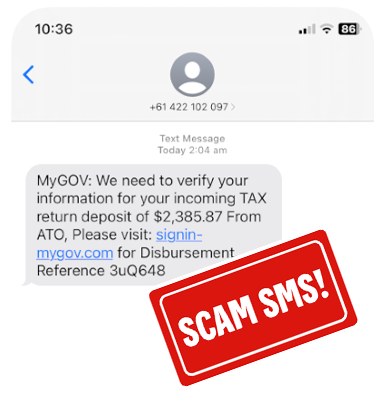
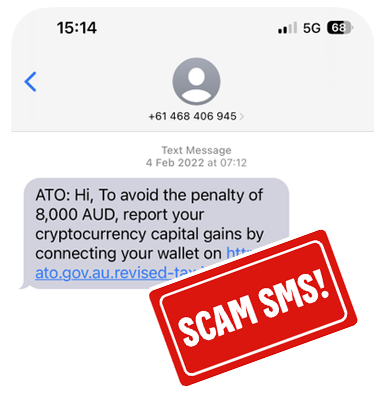
June 2023 - Tax Time Impersonation Scams
Be alert to SMS scams posing as the ATO or MyGov
During tax time scammers often impersonate well known organisations like the ATO or MyGov to gain access to your personal, financial and banking information.
When receiving an SMS that claims to be from a government department, stop and consider what the request is asking you to do, particularly those that have urgent or financial consequences. Always use genuine apps or websites to confirm if you have received a communication through these methods, or validate the query using a trusted phone number.
Do not click any links within the SMS.
To report scams posing as the ATO, visit the ATO's verify or report a scam page.
To report scams posing as MyGov, visit the MyGov scams page.
If you have received an email, SMS or other request that you have identified as potentially fraudulent or a scam account, it’s always a good idea to report this through to us, before deleting it from your inbox and deleted items or your device.
Forward a copy to hoax@westpac.com.au or 0497 132 032.
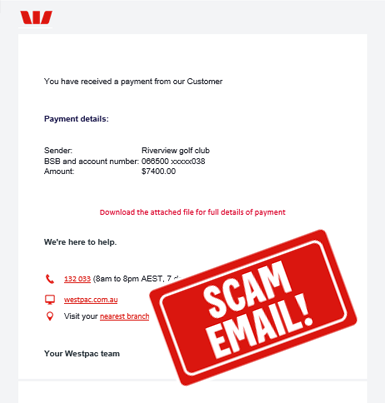
June 2023 - Fake Receipt Scam
Email Subject Line: EFT Payment was made to your account
This scam email claims to be a receipt from a Westpac customer, stating you've received a payment.
The email requests that you download a file to view the details, however if you click the link, you will be taken to a phishing website. The fraudulent website requests your personal and banking information.
Do not click on the attachment in this email.
If you have received an email, SMS or other request that you have identified as potentially fraudulent or a scam account, it’s always a good idea to report this through to us, before deleting it from your inbox and deleted items or your device.
Forward a copy to hoax@westpac.com.au or 0497 132 032.
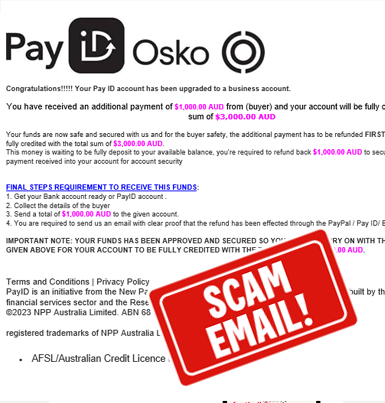
April 2023 - PayID Scam
Be alert to PayID Scams when selling items online
Using PayID is a safe and easy way to send and receive funds.
After a conversation with a potential buyer through an Online Marketplace, such as Facebook or Gumtree, you're advised that you need to upgrade your PayID to a business account for you to receive the payment.
These scam emails state your account has been upgraded to a business account and you need to refund a deposit that has been credited to your account.
Do not act on these emails and report the buyer/seller profile to the marketplace as a potential scam.
Reminder - PayID's are managed within your banking app. A PayID does not need to be upgraded or activated by making payments. For more information on how PayID's work and how you can set up a Westpac registered PayID, visit westpac.com.au/payid.
Also, when selling items online, never provide the buyer with the item until you can see the funds in your account, within your own online or mobile banking. Never rely on a receipt or screenshot of a payment sent to you. Receipts can be falsified by scammers to appear as if they have made payment, when they have not.
If you have received an email, SMS or other request that you have identified as potentially fraudulent or which you think involves a scam account, it's always a good idea to report these through to us, before deleting it from your inbox or deleted items on your device.
Forward a copy to hoax@westpac.com.au or 0497 132 032.
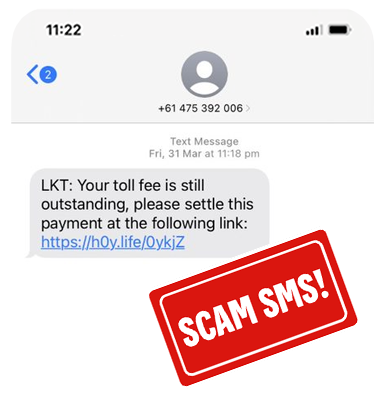
March 2023 - LinkT Scams
Be alert to fake messages requesting toll payments
This SMS scam claims to be from Linkt, stating you have unpaid toll fees.
Linkt advise if you have received a communication from someone claiming to be Linkt and it appears to be suspicious, delete it and do not click on any links.
You can visit the Linkt website to report Linkt SMS scams.

Jan 2023 - Investment Scams
Be alert to fake websites posing as legitimate investment companies
Scammers often impersonate well known financial service companies to gain your trust and confidence when looking for your next investment opportunity. Scammers commonly use legitimate company information to create professional looking websites or documentation, even registering similar domain names.
Often scam websites provide 'advisors' who are readily available to guide you through financial choices to lure you into investing. The advisors remain your point of contact and provide you new or exclusive offers as your "portfolio" increases.
We've been made aware of scammers falsely claiming to represent, or have an affiliation with Magnitude (a subsidiary of Westpac/BT), where emails are received from domain names that appear consistent with a potential genuine email. Please be aware from 30 September 2019, we no longer provide personal financial advice through the authorised representatives of Securitor and Magnitude. For more information on the product offerings BT provides visit bt.com.au.
For more information on investment scams, check out our recent article on "how to invest safely" or our partner IDCare's Investment Scam fact sheet.
Jan 2023 - Scam SMS
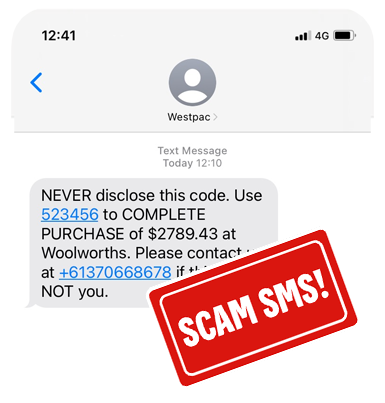
Be alert to unexpected purchase messages
This scam SMS claims to contain a security code required to complete a purchase. It indicates you should call the number provided if you did not make the transaction.
Be aware - If you call the number on this message, you will not be speaking with Westpac. It will be a scammer. They are likely to request your personal or banking information. Do not provide any of this information. Just hang up.
Scammers use the sender name of "Westpac" to try and convince you this is a trusted message, as your phone will automatically group this scam SMS in with legitimate messages sent from Westpac.
Remember - If you have received an email, SMS or other request that you have identified as potentially fraudulent or a scam account, it’s always a good idea to report this through to us, before deleting it from your inbox and deleted items or your device.
Forward a copy to hoax@westpac.com.au or 0497 132 032.
Jan 2023 - Scam SMS
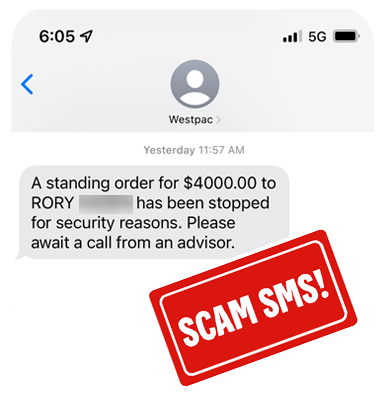
Be alert to messages claiming to be from Westpac
This scam SMS states a standing order has been stopped for security reasons and to await for a call from an advisor.
Be aware - If you receive a call in regards to this message, it will not be from Westpac. It will be a scammer. They are likely to request your personal or banking information. Do not provide callers with any of this information. Just hang up.
Scammers use the sender name of "Westpac" to try and convince you this is a trusted message, as your phone will automatically group this scam SMS in with legitimate messages sent from Westpac.
Remember - If you have received an email, SMS or other request that you have identified as potentially fraudulent or a scam account, it’s always a good idea to report this through to us, before deleting it from your inbox and deleted items or your device.
Forward a copy to hoax@westpac.com.au or 0497 132 032.
Jan 2023 - Scam email
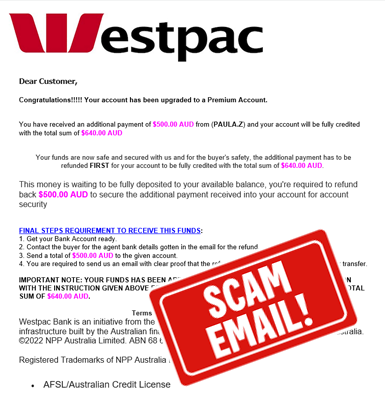
Online Marketplace sellers requested to upgrade their PayID
After a conversation with a potential buyer through an Online Marketplace, such as Facebook or Gumtree, you're advised that you need to upgrade your PayID to a premium account for you to receive the payment.
These scam emails state your account has been upgraded to a premium account and you've received a bonus payment, that needs to be sent to another account.
Do not act on these emails and report the buyer/seller profile to the marketplace as a potential scam.
Reminder - PayID's are managed within your banking app. A PayID does not need to make be upgraded, or activated by making payments. For more information on how PayID's work and how you can set up a Westpac registered PayID, visit westpac.com.au/payid
Also, when selling items online, never provide the buyer with the item until you can see the funds in your account, within your own online or mobile banking. Never rely on a receipt or screenshot of a payment sent to you. Receipts can be falsified by scammers to appear as if they have made payment, when they have not.
If you have received an email, SMS or other request that you have identified as potentially fraudulent or which you think involves a scam account, it's always a good idea to report these through to us, before deleting it from your inbox or deleted items on your device.
Forward a copy to hoax@westpac.com.au or 0497 132 032.
Help when you need it
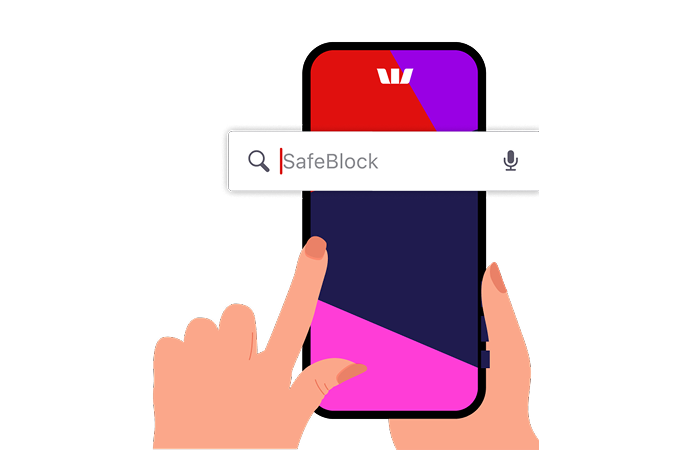
Westpac SafeBlock
SafeBlock puts you in control. If think you’ve shared details with a scammer, you can instantly lock your accounts and cards to stop transactions. Unlock anytime when you’re ready.