
Verification for sole traders
To comply with regulatory requirements, we need you to verify and update your business banking details.
Keep your account compliant and safe
To meet our regulatory obligations, and to better protect your account, we need you to verify and update your details.
Why we’re asking you to do this
Along with other financial institutions in Australia, we identify our customers according to the requirements of Australian Anti-Money Laundering and Counter-Terrorism Financing Act (AML/CTF). This is referred to as our ‘Know Your Customer’ (KYC) requirements.
Keeping your profile up-to-date helps us identify and potentially stop any unusual activity that may occur on your account.
Even if your details haven't changed, it's important that you confirm your details to ensure we have your most recent information on file. We’ll reach out from time to time and request you update your contact details to help keep you and your money safer.
What to do
The fastest way to complete this process is via Online Banking.
If you haven’t already, register for Online Banking. Once registered, you can verify online by following the steps below.
Step 1
Have your ID ready. Acceptable forms of ID include:
- Australian driver licence
- Passport
- Medicare card
- Australian birth certificate.
Step 2
Update your details via:
Westpac App or Online Banking via Mobile
- Sign into the Westpac App or Online Banking via Mobile
- Type Verify ID in the search bar
- Select Verify your ID
- Follow the prompts to verify your personal and sole trader information.
Westpac Online Banking via desktop
- Sign into the Westpac Online Banking via Desktop
- Select Services
- Under Your Preferences select Verify your ID
- Follow the prompts to verify your personal and sole trader information.
If you have any questions, please call our dedicated Business Identification Team on 1800 080 702 then select Option 1, 8am – 6:45pm Sydney time, Monday to Friday.
If you’re unable to verify online, you can complete your verification using a form.
Step 1
Download and complete the Individuals/Sole Trader form (PDF 274KB).
Step 2
Attached certified copies of all required documents listed on first page of form.
For certification, see the FAQ below “How do I certify my identity?”.
Step 3
Return the completed form and documents using one of the options below:
Important: For your security, we can only accept documents sent from the email address currently associated with your customer profile.
Please include in the subject line of your email your Reference number (shown at the top of your letter or email).
Post
If you're sending the documents by post, please make sure you sign them by hand (not a photocopy or digital signature) and return the original documents to:
- If you’re located in Australia, please send via Reply Paid (no postage required) to:
Business Identification Team
Reply Paid 91348
SYDNEY NSW 2001
- If you’re located outside Australia, please pay for postage and reply to:
Business Identification Team
GPO Box 1806
SYDNEY NSW 2001
Australia
Branch
If visiting a branch, don’t forget to bring at least 2 forms of identification, refer FAQ below – How do I certify my identity? Find your nearest branch by visiting the Westpac website and search “Branch Location”.
If you have any questions, please call our dedicated Business Identification Team on 1800 080 702 then select Option 1, from anywhere in Australia (or +61 2 9155 7522 select option 1 then option 1 again, if calling internationally) 8am-6:45pm (Sydney time), Mon-Fri.
Accessibility
Visit Westpac Access and Inclusion for our accessible products and services for people with disability.
Privacy Statement
Our Privacy Statement explains how we collect, use and disclose your personal information and credit-related information. Our Privacy Statement also provides information about how you can access and correct your personal information and make a complaint. You can read our Privacy Statement online or by calling us on 132 032.
Frequently asked questions
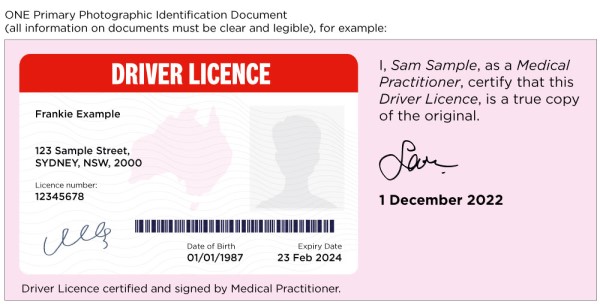
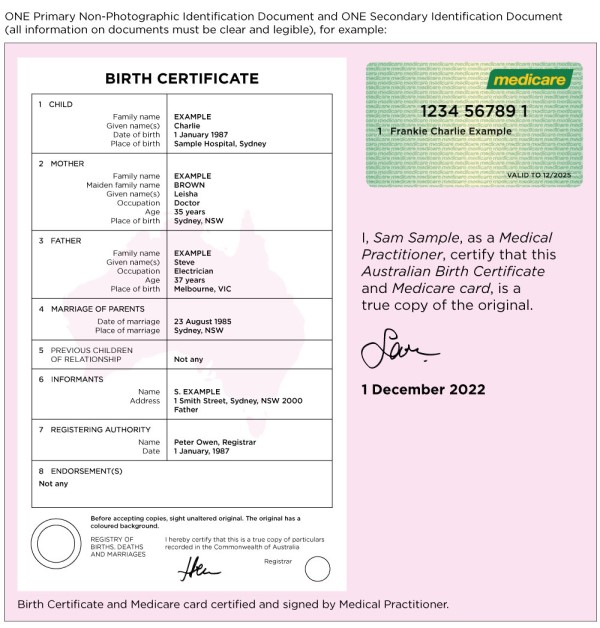
Please provide certified copies of the relevant identification documents as listed on the form, located under the ‘What to do’ section above. The certifier should certify that the photocopy is a true and correct copy of the original by writing on and signing the photocopy (the images in your ID documents need to be clear and easy to read).
For a full list of certifiers, refer how to get your documents certified (PDF 248KB).
An example of certified ID is shown below:
If visiting a branch, don’t forget to bring at least 2 forms of identification such as:
- Valid Australian Drivers licence
- Medicare card
- Passport
- Australian Birth Certificate
- Foreign Passport issued by a foreign government
- Proof of age card
For other forms of valid identification, see our how to verify my identity page.
Scam SMSs or emails usually contain a link to a fraudulent website that asks you to sign into Online Banking to capture your personal information. We have not included any links in this message.
|
Much of the information we hold about you will be stored electronically in secure data centres located in Australia. We also store information in other Westpac Group secure data centres or the data centres of our contracted service providers (including cloud storage providers), and some of these data centres may be located outside Australia.
We use a range of physical, electronic and other security measures to protect the security, confidentiality and integrity of the personal information we hold both in Australia and overseas.
For more information, please see our Privacy Statement.
Westpac takes the protection of its customer information and confidential information very seriously. We have rigorous security measures in place that protect the privacy and confidentiality of our customers, including industry best practice security and fraud detection techniques. We also constantly monitor the environment for emerging cyber threats, security issues and potential vulnerabilities across the Westpac Group.
We understand you may have questions and need time to provide all the required details. However, if you do not provide all the required details, we may not be able to update your profile and therefore may restrict your account and the opening of new products and services due to regulatory requirements, until you confirm that all your details are complete and up to date.
|
To unrestrict your account, please refer to the ‘What to do’ section above for the document(s) that need to be submitted.
If you have any questions, please call our dedicated Business Identification Team on 1800 080 702 then select Option 1, from anywhere in Australia (or +61 2 9155 7522 select option 1 then option 1 again, if calling internationally) 8am-6:45pm (Sydney time), Mon-Fri.
Our team will let you know the steps you need to take to ensure all your records are up to date.
If you are a customer registered for Internet Banking, you may be able to verify and update your details using the Westpac App or Online Banking via Mobile.
There may be 3 parts to the request:
- Verifying your identification
- Updating your employment and personal information
- Updating and verifying your contact details
Sign into the Westpac App or Online Banking via Mobile
- Type Verify ID in the search bar
- Select Verify your ID and verify your personal information. Or;
Sign into Online Banking via Desktop
- Select Service, then under Your Preferences select Verify your ID and verify your personal information.
To register for Online Banking
For more information on how to register for Online Banking, please see Westpac Online Banking.
Overseas tips
- If you are overseas, the steps below can help you navigate through the process online or call us on +61 2 9155 7522 select option 1 then option 1 again, 8am-6:45pm (Sydney time), Mon-Fri.
- Have your international mobile number added to contact details via the Profile section at the bottom of your Westpac App
- Make sure you check the box to nominate the international mobile number as the one on which you receive your One Time Password (OTP) via SMS
- Please call (+61 2) 9155 7000 to activate SMS Protect on your international/overseas mobile number
- Once activated, you should be able to progress with updating your employment and income information by searching ‘Update contact details’ in the search bar
- A One Time Password (OTP) will be sent to authenticate your login once again in order to complete the request.
Yes, your Power of Attorney can complete this on your behalf by either visiting a branch with original documents or certified versions of the documents; or if you have been provided a form they can complete the form on your behalf, including certified versions of the documents and mail it to address noted on the form.
Please ensure you have registered your Power of Attorney with Westpac before your Power of Attorney attends the branch to act on your behalf. For full instructions on how to register your Power of Attorney with Westpac please visit our Power of Attorney page.
The account holder/s who are required to update their details will receive communications from us advising the steps they must take. If any party fails to complete the process within the timeframe specified, all account holders will be restricted from accessing any joint accounts.
Things you should know
Read the Westpac Online Banking Terms and Conditions (PDF 745KB) before making a decision and consider whether the product is right for you.