
Savings Finder
Spot where your savings are hiding – it takes a little Westpac to turn everyday spending into everyday savings.
From forgotten subscriptions to found savings
Using the Savings Finder tool in the Westpac App, you can get a clearer view of your spending habits and spot opportunities to save:
See a list of regular bills and subscriptions.
Identify areas where you may be overspending.
Take action by reviewing which expenses you could lower or cancel.
How Savings Finder could help you
Check your regular bills, fees and subscriptions
Spot areas where you might be overspending
Make confident money saving decisions
Cancel subscriptions in the Westpac App
Find, manage and cancel your subscriptions directly with eligible merchants, in the Westpac App.
How it works
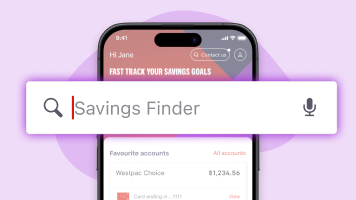
1. Open the Westpac App
Sign into the app and search Savings Finder in the Smart Search bar on your home screen.
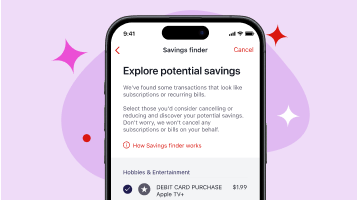
2. Review Bills and Subscriptions
From the list of your regular expenses (including bills and subscriptions), select the ones you want to review.
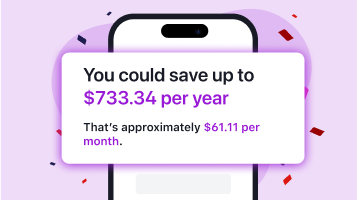
3. Identify potential savings
Select Next. The tool gives you an estimated savings breakdown and identifies expenses you could cancel or reduce.
You can also manage and cancel eligible subscriptions in the Westpac App.
Get started with Savings Finder
To enjoy the benefits of Savings Finder and other clever tech Westpac App features, you need to be a Westpac customer.
Personalised Insights, right where you need them
Get tips and alerts that help you spot trends, avoid surprises and stay in control of your money. You’ll find them on your Westpac App home screen or in the Insights tab. The more you use our money tools, the smarter and more personalised your insights become.
More ways to help you


Need help cancelling a direct debit?
The Westpac App also includes a helpful feature to assist with cancelling direct debits - supporting you through the final step of saving.


Things you should know
Before making a decision about any of our products or services, please read all the terms and conditions and consider whether the product or service is right for you. Fees and charges apply and may change.
* Note that changes made in Savings Finder will not automatically update in your Bills Calendar. You will need to amend them separately to keep your records accurate.
Read the Westpac Online Banking Terms and Conditions (PDF 899KB) at westpac.com.au before making a decision and consider whether the product is right for you.
Apple, the Apple logo and iPhone are trademarks of Apple Inc., registered in the U.S. and other countries. App Store is a service mark of Apple Inc.
Android, Google Play and the Google Play logo are trademarks of Google LLC.
© Westpac Banking Corporation ABN 33 007 457 141 AFSL and Australian Credit Licence 233714.