
Register for Westpac Online Banking
Manage your accounts securely online. Get anywhere, anytime access via desktop or the Westpac App.
Manage your banking securely anytime, anywhere
- Check your account balance
- Pay bills, transfer funds or pay anyone
- Check your statement
- Update your contact details
Let’s help you get started
Not a Westpac customer?
Enjoy the benefits of Westpac Online Banking by becoming a customer. Let’s help you find an everyday account or credit card that fits.

It’s quick and easy to register
You can register for Online Banking using your desktop or a smartphone if you download the Westpac App. You'll need your card number, Customer ID, and account information on hand. You can find your Customer ID near the top of your bank statement. Once registered, you can access Online Banking via desktop or the app.


Here’s how to register
In the Westpac App
Make sure you have the latest version of the app.
- Tap Existing customer
- Tap Register for Online Banking
- Enter your Customer ID or card number, name and date of birth
- Answer any security questions, if asked
- Create a password
- Confirm your email and phone number
In Online Banking
- Select Sign in
- Select Register for Online Banking
- Enter your card number or Customer ID
- Answer the security questions, if asked
- Create a password
- Confirm your email and phone number
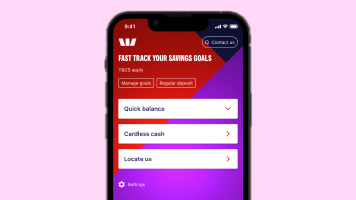
Do your banking online in the Westpac App
Take your bank with you wherever you go with the Westpac App. With security features like fingerprint ID, the ability to talk to someone 24/7 and conveniently track cash flow and spending in just a few taps, you can bank with confidence.

Make the most of all the Online Banking features
Check your account balance, pay bills and transfer funds on the go, including managing your credit cards, from locking or reporting a lost or stolen card to a new card request. Discover the benefits and features of Westpac Online Banking.
Questions?
Find answers to some of the most frequently asked questions:
- Can I reset my password or Customer ID?
- Where do I find my Customer ID?
- Can I use my Online Banking details to sign into the Westpac App?
- How do I update my contact details?
- How do I identify unknown transactions?
- Where can I find my transaction history?
- How do I make transfers and payments?
- How do I delete my Online Banking access?
Find it fast with Smart Search
Simply type what you’re looking for in the search bar. Available on the latest Westpac App.
Westpac Protect™ Online Banking Security Guarantee
If your Westpac account is compromised due to Online Banking fraud, we guarantee to repay any missing funds, provided you complied with our Online Banking Terms and Conditions.

Things you should know
Read the Westpac Online Banking Terms and Conditions (PDF 899KB) at westpac.com.au before making a decision and consider whether the product is right for you.
Westpac’s Online Banking Security Guarantee: If your Westpac account is compromised as a result of Internet fraud, we guarantee to repay any missing funds, providing you comply with our Online Banking Terms and Conditions. This includes keeping your sign-in details (including passwords, Westpac Protect™ SMS codes and SecurID® Token codes) private. You must inform us immediately if you suspect the security of your access details has been compromised, or you suspect an unauthorised transaction or potential fraud on your accounts.
The Westpac App and Westpac Tablet Banking App are only available for use by Westpac Australia customers.
Internet connection is needed to access Westpac App. Normal mobile data charges apply.
iPhone, iPad, iPod touch and Apple Watch are trademarks of Apple Inc., registered in the U.S. and other countries. App Store is a Service mark of Apple Inc.
Android, Google Play and the Google Play logo are trademarks of Google LLC.