
Latest Scams & Alerts

Latest scams and alerts
We're working all the time to better safeguard your financial and personal information.
To help better protect you against scams, this page will provide information on some of the scams around at the moment.
July 2026 - Email Scams
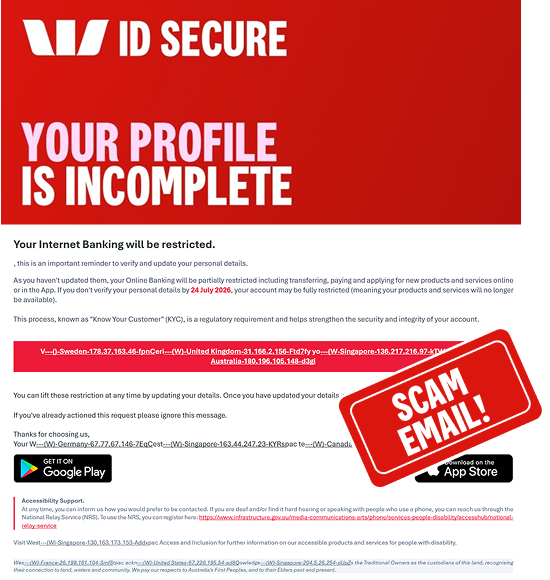
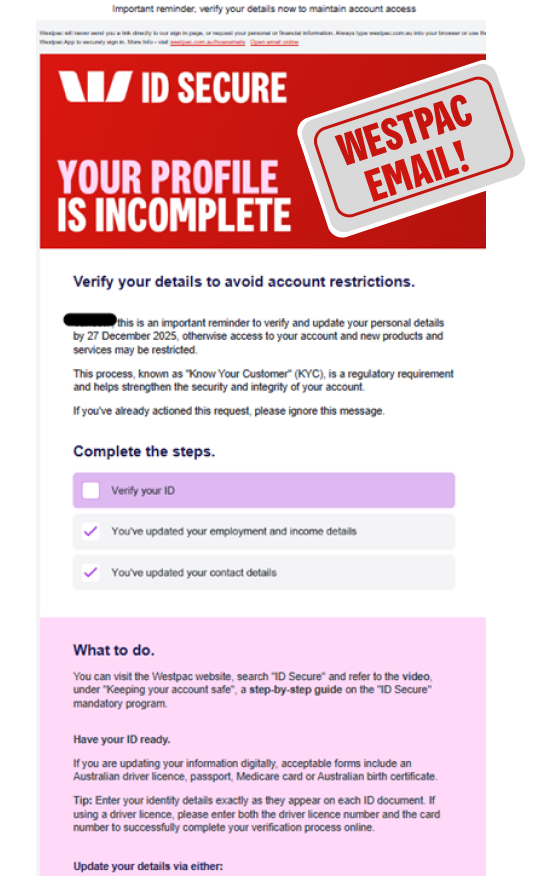
Westpac Online Banking verification email scam
This scam email impersonates Westpac and claims your Online Banking access will be restricted unless you verify or update your personal details by a specified date. It creates a sense of urgency and encourages you to click a link that leads to a fake website designed to steal your personal and banking information.
While Westpac may contact customers about updating or verifying their information, we won't ask you to verify your identity by clicking on a link in an email or SMS. If you're unsure, access Westpac through a trusted channel or by contacting us directly. This email did not come from Westpac.
What to do
- Watch out for long, unusual or unfamiliar web addresses
- Always access your Online Banking by typing westpac.com.au into your browser or using the App.
If you've clicked on the link
- Use another device to change your Online Banking password immediately
- Keep an eye on your accounts for unusual activity
- Contact us immediately so we can help protect your accounts.
If you believe you’ve received a scam impersonating Westpac report it before deleting it. Forward a copy to hoax@westpac.com.au or 0497 132 032.
July 2026 - Westpac Impersonation Scam
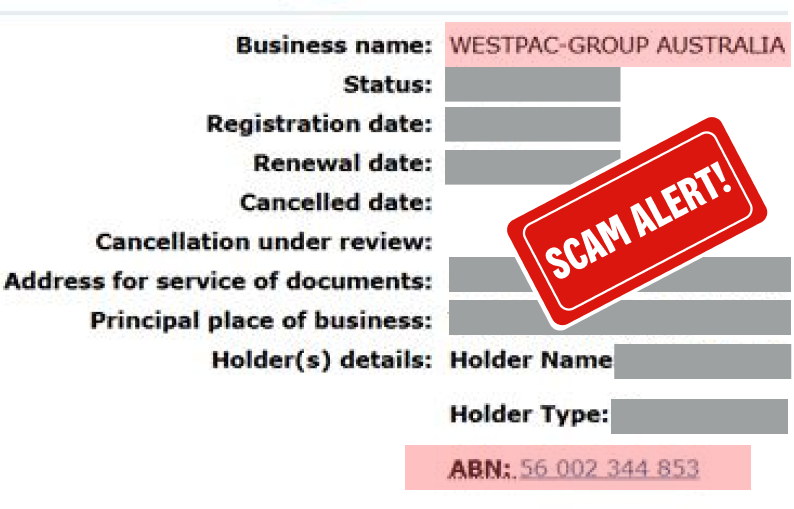
We've been made aware of a business operating under the name "Westpac-Group Australia" that claims to be associated with Westpac. This business is not affiliated with Westpac and has not been authorised to use the Westpac name.
If you're contacted by this business, asked to make a payment, or directed to visit a website claiming to represent Westpac, take extra care and verify the request through official Westpac channels.
What to do
- Be cautious of businesses, websites, emails or messages claiming to be us that use names other than our official brands
- Before making a payment, independently verify the business and payment details
- Never provide passwords, security codes or banking details in response to unsolicited requests.
If you've shared information or made a payment
- Contact us immediately so we can help protect your accounts.
If you believe you’ve received a scam impersonating Westpac report it before deleting it. Forward a copy to hoax@westpac.com.au or 0497 132 032.
May 2026 - Email Scams
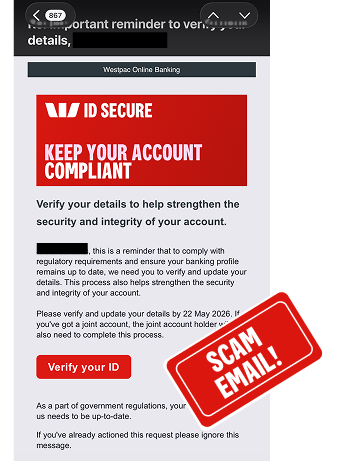
Westpac ID Secure Impersonation
This scam email claims to be from Westpac, asking you to verify or update your details to keep your account "compliant" with regulatory requirements. It may include your name and a deadline to create urgency, along with a "Verify your ID" button. Westpac will never send emails with links asking you to verify your details or sign in to Online Banking. The button instead links to a fake website designed to capture your personal and banking details, which scammers may then use to access your real account. This email did not come from Westpac.
What to do
- Be cautious when clicking on links or buttons in emails, and hover over them to check the URL is legitimate
- Watch out for long, unusual or unfamiliar web addresses
- Always access your Online Banking by typing westpac.com.au into your browser or using the App. We'll never ask you to sign in to Online Banking via a link in an email.
If you've clicked the link
- Use another device to change your Online Banking password immediately
- Keep an eye on your accounts for unusual activity
- Contact us straight away so we can help protect your accounts.
If you believe you’ve received a scam impersonating Westpac report it before deleting it. Forward a copy to hoax@westpac.com.au or 0497 132 032.
March 2026 - SMS Scams
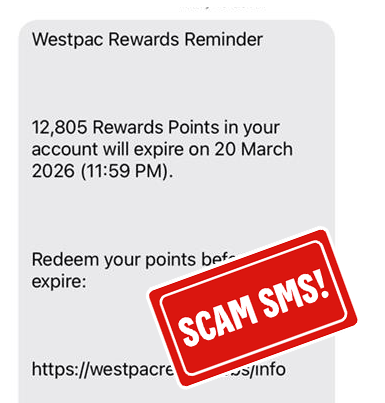
Westpac Rewards impersonation SMS
This phishing SMS claims to be from Westpac, warning that your Rewards points are about to expire. The message includes a link to “redeem” points, which leads to a fake website designed to capture your banking details. Scammers may then use these details to access your real account. This message did not come from Westpac.
What to do
- Don’t click on links in unexpected SMS
- Westpac won’t ask you to sign in via an SMS link to redeem rewards
- Always access your Online Banking by typing westpac.com.au into your browser or using the Westpac App.
If you’ve clicked the link
- Change your Online Banking password immediately
- Keep an eye on your accounts for unusual activity
- Contact us straight away so we can help protect your accounts.
December 2025 – Impersonation Scams
Email scams impersonating Westpac
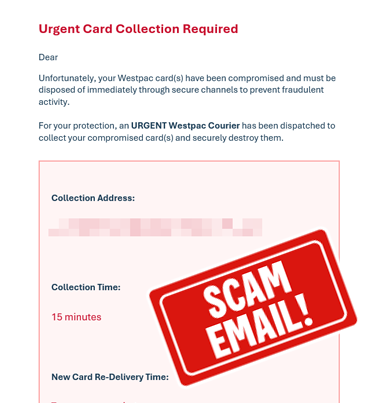
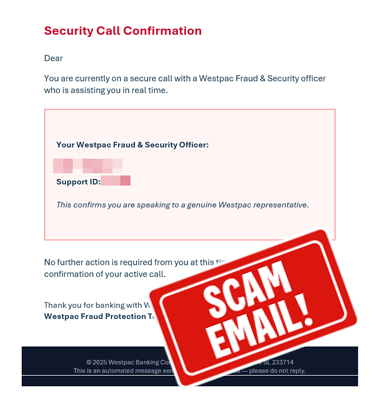
This scam email claims to be from Westpac, advising your card has been compromised and requires a courier to collect. The second example looks similar but attempts to provide verification you are speaking with a Westpac team member.
We will not send you either of these emails, they are examples of scam emails designed to make you believe the request is legitimate.
Remember, If you’re contacted by us, either by email or via a phone call, even by our Fraud team, we will never ask you to complete any of the following actions:
- Share your Online Banking Password, Card PIN, CVC or leave your card in your letterbox for us to collect via courier
- Share an Online Banking Security Code (either sent via SMS, displayed on a Token or from Security Code via the App)
- Ask you to install software that allows us to connect to your device
- Sign into your Online Banking with remote access software on your device.
If you have received an email, SMS, phone number or a request that you have identified as potentially fraudulent or a scam account related to Westpac, it’s always a good idea to report this through to us, before deleting it from your inbox and deleted items, or your device.
Forward a copy to hoax@westpac.com.au or 0497 132 032.
December 2025 – SMS Scams
Check it's our numbers before calling.
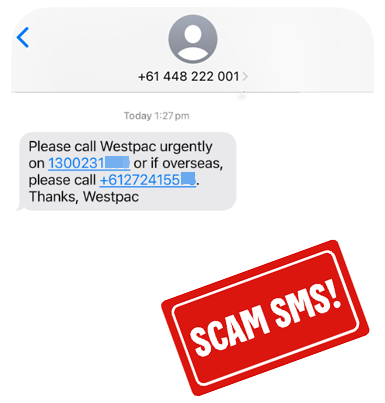
This SMS claims you need to call Westpac urgently, using a number that does not appear on our contact us information on our website. It impersonates the number used for sending Security Codes, making the message look legitimate because your phone will include these texts alongside our genuine Security Code messages.
Scammers use this tactic to make you believe Westpac is contacting you and prompt you to act.
Be aware - If you call the number in this message, you will not be speaking with Westpac. It will be a scammer. They are likely to request your personal or banking information. Do not provide any of this information.
Remember, If you’re contacted by us, even our Fraud team, we will never ask you to complete any of the following actions:
- Share your Online Banking Password, Card Pin or CVC number
- Share an Online Banking Security Code (sent via SMS, displayed on a Token or from Security Code via the App)
- Ask you to install software that allows us to connect to your device
- Sign into your Online Banking with remote access software active on your device.
Remember - If you have received an email, SMS, phone number or a request that you have identified as potentially fraudulent or a scam account related to Westpac, it’s always a good idea to report this through to us, before deleting it from your inbox and deleted items, or your device.
Forward a copy to hoax@westpac.com.au or 0497 132 032.
December 2025 – Email Scams
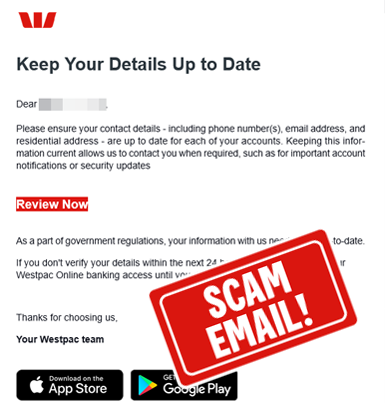
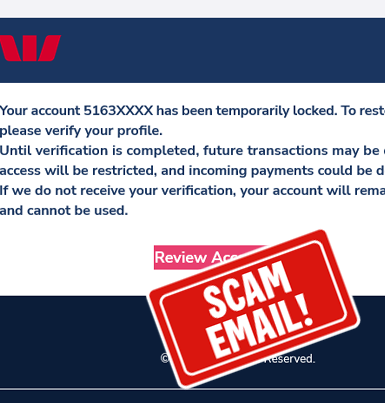
Be alert to scam emails asking you to click a link
We will not send you an email that asks you to click a link to review your access, or to update your personal information.
Scammers often design emails to look like they’re from legitimate organisations, using similar imagery and language. They make subtle changes—such as altering the actual destination of buttons or links—to disguise their intent and make the email appear as if it could be from Westpac.
Tip: Always check the sender address, hover over links to check the website you are being directed to and pause to check if there is also a message in your banking app. Always visit our site directly by typing in westpac.com.au to your browser or use the app instead of using links in an email or SMS.
Remember, If you’re contacted by us, even our Fraud team, we will never ask you to complete any of the following actions:
- Share your Online Banking Password, Card Pin or CVC number
- Share an Online Banking Security Code (sent via SMS, displayed on a Token or from Security Code via the App)
- Ask you to install software that allows us to connect to your device
- Sign into your Online Banking with remote access software active on your device.
Remember - If you have received an email, SMS, phone number or a request that you have identified as potentially fraudulent or a scam account related to Westpac, it’s always a good idea to report this through to us, before deleting it from your inbox and deleted items, or your device.
Forward a copy to hoax@westpac.com.au or 0497 132 032.
September 2025 – Impersonation Scams
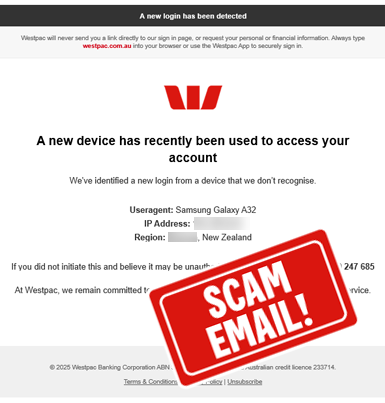
Email Subject Line: New Sign-In Alert – Please Confirm It Was You
This scam email, claiming to be from Westpac, states a new device has been used to access your account. The email contains falsified device details, to encourage you to call the number included within the email.
Do not call the number contained in the email.
If you call the phone number, it may impersonate similar hold music or voice overs of those heard on the legitimate Westpac phone numbers.
Remember, If you’re contacted by us, in email or via a phone call, even by our Fraud team, we will never ask you to complete any of the following actions:
- Share your Online Banking Password
- Share an Online Banking Security Code (either sent via SMS, displayed on a Token or from Security Code via the App)
- Ask you to install software that allows us to connect to your device
- Sign into your Online Banking with remote access software on your device.
If you have received an email, SMS, phone number or a request that you have identified as potentially fraudulent or a scam account related to Westpac, it’s always a good idea to report this through to us, before deleting it from your inbox and deleted items, or your device.
Forward a copy to hoax@westpac.com.au or 0497 132 032.
July 2025 – Impersonation Scams
Be alert to fake Westpac websites with Remote Access Software
We're aware of people receiving calls, claiming to be Westpac staff, that request you to visit a fake website that may look and feel very similar to the Westpac website, however it is not. The fake website contains links that will download remote access software.
The genuine Westpac website is westpac.com.au. There are no other versions of this domain name that any employee would direct you to. A domain name is like a street address for the internet - if you use the wrong address, you will not be visiting the right place (or in this case, website).
After downloading the software, the third party who directed you to this fake website will then request access to your device. Their connection name may even impersonate Westpac. The application is a form of remote access software.
When a user establishes a connection with a third party, it allows them the ability to remotely control your device - indicators of an active session includes your mouse moving or browsers opening without you performing this function.
Once a connection has been established, they can see and manipulate information on your computer, or within your browser.
Remember, If you’re contacted by us, even our Fraud team, we will never ask you to complete any of the following actions:
- Share your Online Banking Password
- Share an Online Banking Security Code (sent via SMS, displayed on a Token or from Security Code via the App)
- Ask you to install software that allows us to connect to your device
- Sign into your Online Banking with remote access software on your device.
Remember - If you have received an email, SMS, phone number or a request that you have identified as potentially fraudulent or a scam account related to Westpac, it’s always a good idea to report this through to us, before deleting it from your inbox and deleted items, or your device.
Forward a copy to hoax@westpac.com.au or 0497 132 032.
Help when you need it
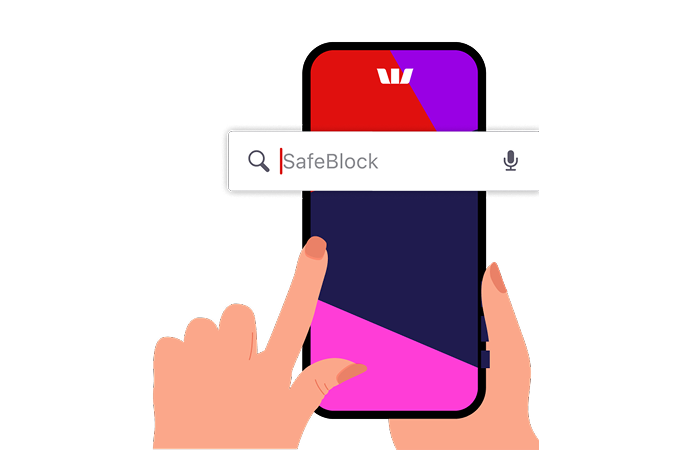
Westpac SafeBlock
SafeBlock puts you in control. If think you’ve shared details with a scammer, you can instantly lock your accounts and cards to stop transactions. Unlock anytime when you’re ready.