Safe and secure banking for young people
We make banking safe for young people and give parents a way to help along the journey to independence. We’ve added new ways to help young customers manage their money safely.

Opening a bank account is an exciting first step for a young person. We help to make the journey safe and give parents the chance to guide and support along the way. A good place to start is for children under 14 to have a parent or guardian as a signatory on their account.
white-with-icons
Kid-friendly features
false
Daily limit controls
A Daily Payment Limit is the maximum amount of money that can leave an account in 24 hours. Under 14s that open a Choice Youth account will have a daily spending limit of $50. This limit can be changed anytime in Online Banking or the Westpac App when needed.
Weekly spend limit
A Weekly Spend Limit is the maximum amount of money that can be spent per week on a Debit Mastercard®. An optional feature that can be set up in the Westpac App. This handy tool could help teach children to manage their money, by not spending it all at once. Card transactions will be declined as the Weekly Spend Limit has been reached. Change the limit as they get more experience with using their card for purchases.
For customers aged 8-14, a default weekly limit of $50 applies, which can be changed in Online Banking or the Westpac App.
How can parents or guardians change spending limits?
- First, a parent or guardian needs third party value access to the account
- The child must have Online Banking set up
- The child’s Debit Mastercard needs to be turned on.
Once these steps are done, parents or guardians can change how much money their child can spend.
How can a child who is 14 or over change spending limits?
Customers who are 14 or older can update their limit in the Westpac App or Online Banking.
In the Westpac App:
1. Search Daily Payment Limit.
2. Follow the prompts to enter the new limit.
In Online Banking:
1. Go to Service > Preferences > Daily Payment Limit
2. Select Update my Daily Payment Limit.
3. Enter your new limit, then select Save.
Online payment restrictions
If a Choice account holder is under 14, BPAY® and international payments are blocked. These payments can’t be made in Online Banking or the Westpac App. They can only be made in-branch.
Spending restrictions
To help protect you, we may decline some transactions on your Westpac Debit Mastercard based on the type of merchant. While this adds an extra layer of protection, it may not prevent all transactions with higher risk merchants.
Gambling block
Kids and teens under 18 have a gambling block on their debit cards, but it may not prevent every gambling transaction. The block will switch off automatically when the cardholder turns 18. Find out more
Parental Control feature
To access Parental Control, a parent or guardian must be a signatory on the child’s account. Parental Control is mandatory for children:
- Under 12 for a Bump savings account
- Under 14 for a Choice Youth everyday account.
Parental Control is optional for older children. Access levels can be changed in-branch by the child at any time.
How can a parent/guardian change access levels?
In the Westpac App or Online Banking:
- Find your child’s account
- Select Family Hub
Card management controls
Kids as young as 8 can get a Debit Mastercard with a Choice Youth account. Temporarily lock or unlock your child's debit card anytime. Report it lost or stolen to order a new card if it can't be located.
How can a parent/guardian lock or unlock or report a child's card to order a new one?
In the Westpac App or Online Banking:
- Find your child’s account
- Select Family Hub
Controls on savings accounts
With a Bump savings accounts, parents or guardians can decide how much account access a child can have. They can choose to give View Only or View and Transact access. Access limits can be changed or removed at any time.
Parental notifications
Parents or guardians with third-party access can set up push notifications in the app. This helps keep track of unexpected activity or high spending. A notification is sent when money goes in or out of the child’s account. Notifications can be set up on Choice Youth and Bump Savings accounts.
Tip: Give your child’s accounts nicknames to distinguish them from your own. Learn how
How can a parent/guardian set up Push Notifications?
- Make sure you have the latest version of the Westpac App.
- In the App, search Notifications and follow the prompts to set them up.
What’s a Push Notification?
Push Notifications are messages sent to your mobile phone. They help keep you updated by providing alerts about:
- Money moving in or out of your account (or an account you have third party access to)
- Important updates or reminders
- Tips or information about an account.
You can manage or set up Push Notifications in the Westpac App, Online Banking, or at a branch.
Double your $50 with us!
grey
pictogram
dollar-sign-light
Cashback offer
Double your $50
When you bank and save with Westpac
Open a new Choice Youth everyday account and an eligible savings account together by 31st March 2027, and here’s how you can get $50:[#]
- Deposit $50 or more into your new Choice Youth everyday account within 10 days.
- We’ll add $50 to your savings account once you meet the criteria.
- You must not have held any Westpac transaction account or savings account in the last 2 years years.
Find out more
none
true
false
- product-service:savings-accounts/youth-choice-bump-bundle-kids
- product-service:savings-accounts/youth-choice-bump-bundle-kids
Cashback offer
A kid's savings and a youth everyday account
Get a Westpac Bump account to separate your savings from your spending. Set up Savings Goals and get bonus interest when you make regular savings.
icon
piggy-bank
Offer
true
Double your $50 when you bank and save with Westpac
Open a new Choice Youth everyday account and an eligible savings account together by 31st March 2027, and here's how you can get $50:[#]
- Deposit $50 or more into your new Choice Youth everyday account within 10 days.
- We’ll add $50 to your savings account once you meet the criteria.
- You must not have held any Westpac transaction account or savings account in the last 2 years years.
Rates
Earn up to:
5.30% p.a.
Total variable interest rate
With a:
1.75% p.a.
Standard variable base rate
To earn bonus interest[#] over the month:
- Account balance must not fall below $0 at any time
- Make at least one deposit. Interest paid into the account doesn’t count
- Account balance on the last business day of the month is higher than the account balance on the last business day of the previous month.
Open now
false
Find out more
false
- product-service:savings-accounts/youth-choice-bump-bundle-kids
- product-service:savings-accounts/youth-choice-bump-bundle-teen
Cashback offer
A Teens savings and a youth everyday account
Get a Westpac Bump account to separate your savings from your spending. Set up Savings Goals and get bonus interest when you make regular savings.
icon
ice-cream
Offer
true
Double your $50 when you bank and save with Westpac
Open a new Choice Youth everyday account and an eligible savings account together by 31st March 2027, and here's how you can get $50:[#]
- Deposit $50 or more into your new Choice Youth everyday account within 10 days.
- We’ll add $50 to your savings account once you meet the criteria.
- You must not have held any Westpac transaction account or savings account in the last 2 years years.
Rates
Earn up to:
5.30% p.a.
Total variable interest rate
With a:
1.75% p.a.
Standard variable base rate
To earn bonus interest[#] over the month:
- Account balance must not fall below $0 at any time
- Make at least one deposit. Interest paid into the account doesn’t count
- Account balance on the last business day of the month is higher than the account balance on the last business day of the previous month.
Open now
false
Find out more
true
- product-service:transaction-accounts/choice-youth-account
none
false
Opening a youth account online
none
Under 14 years old
A parent or guardian can open a Westpac Choice Youth account online by opening a Westpac Bump savings account at the same time.
Already have a savings account?
To open a Westpac Choice Youth account only, open the account at a Westpac branch.
14 years and over
Open a Westpac Choice Youth account online without a branch visit or assistance from a parent or guardian.
Need a savings account?
Open a Westpac Bump savings account at the same time as you open your Westpac Choice Youth account. Open both accounts now online
grey
Explore the Westpac app and security features
app-action-card
Westpac App
Australia's #1 Banking App
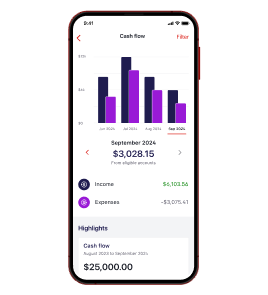
Rest assured knowing the smart budgeting and savings tools on Australia's best banking app[#] can help you get more from your dollars.
[BVAR#wbc-public-domain]/personal-banking/online-banking/insights-hub/spend-insights-and-budgeting-tools/
Apple
Android
action-card
Spend&Save
Everyday banking and up to 5.95% p.a. on savings
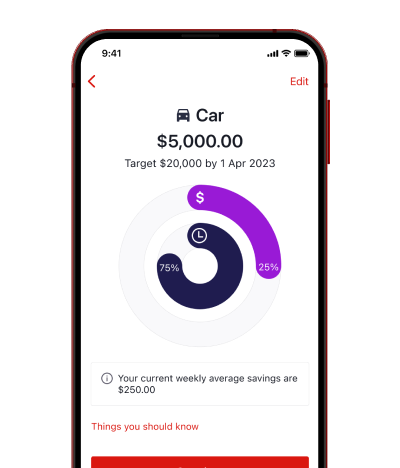
Aged 18-40? You could earn bonus interest when you Spend&Save using a Westpac Life and Choice account together.
Apple
Android
action-card
Award-winning security
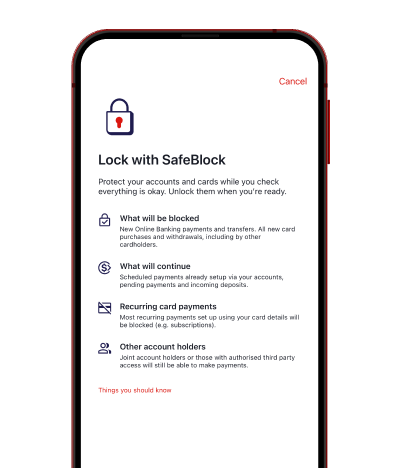
Secure your account with safeblock
Find out how Canstar's 2026 Innovation Excellence Award winner SafeBlock can help keep you safe when you need it most by locking your cards and account.
[BVAR#wbc-public-domain]/security/how-we-protect-you/westpac-safeblock/
Apple
Android
false
true
Frequently asked questions
A signatory is someone, such as parent, grandparent, or guardian, who can operate an account in branch. If the account holder is under 14, they are required to have a signatory on their account.
A third party is someone who has been granted access to an account in Online Banking. This person can see the account in their own Online Banking and depending on their permission level can either view the account only, or view and transact with the account. A third party may or may not be the same person as a signatory.
Access can be set up when an account is opened, or it can be added in branch.
For parents or guardians
Check and change who has third party access
You may wish to chat with the account holder about who else has access to their account and how setting up these controls can help keep their money safe.
How to check and change third party access in Online Banking on a PC or laptop:
1. In your child’s Online Banking, select the account you want to check
2. Select third party access
3. You’ll see a list of people who can access the account.
If the account holder is happy to have anyone’s access removed or the type of access changed:
4. Select the arrow next to the person’s name
5. Select Remove > Confirm
6. Use Edit to change the type of access they have.
Alternatively, you can visit us in branch or call us.
For kids 14 or over
How to check and change third party access in Online Banking on a PC or laptop:
1. Select the account you want to check
2. Select Third party access
3. You’ll see a list of people who can access you account.
If you're sure you want to remove anyone’s access any you're 14 or over:
4. Select the arrow next to the person’s name
5. Select Remove > Confirm
6. Use Edit if you want to change the type of access they have.
If you have more than one account, select Back to choose another one to check.
Under 14?
You'll need to visit a bank if you want to change access to an account.
- Sign into Online Banking
- Use search function to navigate to Manage account access
- Confirm the action.
Important:
- You can only remove or edit access for someone you have previously granted access to.
- Once access is removed, it cannot be reinstated online. To restore access, you will need to visit a branch. Please contact the branch to book an appointment with a banker.
Note: If you're unable to remove access via self serve, you can attend the branch or call us for assistance.
To have Parental Control, a parent, grandparent, or guardian must be an account signatory. As the account holder, the child must also be registered for:
- Westpac Online Banking
- Westpac Telephone Banking
to access their account online or over the phone.
Self-service Telephone Banking is not available and Parental Control is mandatory for children:
- Under 12 for a Bump savings account
- Under 14 for a Choice Youth everyday account.
Parental Control is optional for older children. Access levels can be changed in-branch by the child at any time.
Parental Control doesn't apply to a child’s access to funds in-branch. However, a signatory must authorise branch withdrawals where a child is under 14, and a debit card isn't available.
Upon opening a Westpac Choice Youth account, holders aged 14 and over will automatically receive a Debit Mastercard. Debit cards must be ordered separately for younger account holders aged 8 to 13.
1. Register for Online Banking
Both parents/guardians and the child (as the account holder) will need to be registered for Online Banking. Register now
2. Download the Westpac App
Parents/guardians should download the Westpac App to order the card on the child's behalf and access their child's card controls. Get the Westpac App
3. Order a new Debit Card
Parents/guardians with third party access to a child's account can order the debit card by signing into the Westpac App, using their Online Banking, not the child's:
Search for and then tap Family Hub
Find the child's Westpac Choice Youth account
Order Debit Mastercard.
4. Activate Debit Card
Upon receipt of the card, the child must sign in to Online Banking using their Customer ID and password to activate it. If you'd prefer your child not use Online Banking, the card can be activated at any branch.
Upon opening a Westpac Choice Youth account, holders aged 14 and over will automatically receive a Debit Mastercard. Debit cards must be ordered separately for younger account holders aged 8 to 13.
You can only request third party access to an account by visiting us in branch. Remember to bring your ID documents, your child’s ID documents, and their 8-digit customer ID. If you aren’t a signatory to the account, you’ll need approval from a signatory if the child is under the age of 14.
Once you’re set up, you’ll be able to view their account in your own Online Banking or Westpac App.
If a Choice account is shared, the under 14 account holder can’t make BPAY payments or send money overseas until they turn 14. Once they’re 14 or older, they can make these payments.
Everyone who has access to a joint Choice Youth account can get Push Notifications, no matter how old they are.
grey
Help when you need it
Money matters for kids
none
Things you should know
For more information about each bank account and the specific product disclosures, please go to Westpac Choice Youth or Westpac Bump savings.
World Mastercard®, Mastercard® and the Mastercard brand mark are registered trademarks, and PayPass is a trademark of Mastercard International Incorporated.
BPAY® is a registered trademark of BPAY Pty Ltd ABN 69 079 137 518.