Partpay
Pay in four where you couldn't before. Split purchases of $100 or more into 4 payments, using PartPay on your credit card account.

true
See our credit cards
Turn on via the Westpac App
[BVAR#cms-domain]/app/native/webview?targetPath=%2Fsecure%2Fbanking%2Fmobile%2Floadview%3FscreenId%3DcontextualReissueCard&filterType=cards&filterContext=turnOnPartpay&pid=iwc:ob:ReissueCard_1907:magicSearch&webfallback=https%3A%2F%2Fwww.westpac.com.au%2Fpersonal-banking%2Fcredit-cards%2Fpartpay%2Ferror%2F
You’ve probably heard of Buy Now Pay Later (BNPL) services. Our credit card feature – PartPay[#] – is similar, in that it lets you split purchases of $100 or more into 4 payments over 6 weeks.
However, there are some big differences.
Unlike others, PartPay is a payment feature of your credit card – it’s not an account by itself. So you have the same credit card protection, and you can’t spend beyond your existing available credit limit.
Why use PartPay?
white
calendar
Split purchases
Split purchases of $100 or more into 4 payments over 6 weeks.
credit-card
No separate application
No need to apply. Just turn on[#] PartPay in the Westpac app to add a separate digital PartPay Card to your account.
person
Same credit card account
Same credit limit, same security, rewards and added extras.
phone
Digital card only
Using the Westpac App and through your digital wallet.
white
How PartPay works
How to set up PartPay
Step 1
To access PartPay you need to have a Westpac Low Rate, Low Fee, Altitude Platinum or Black credit card account. You can use PartPay wherever Mastercard® is accepted.
Step 2
Turn on via the Westpac app to activate PartPay.
Step 3
Once activated, you’ll be issued a separate digital PartPay Card linked to your Credit Card account. Split purchases of $100 or more with your PartPay Card using the Westpac App or your digital wallet.
none
How to make payments after a purchase
- Payments are made via PartPay Autopay (our automated card payment service). You need to set up a separate Autopay when you turn on PartPay - even if you already have Autopay set up to make other payments on your credit card account.
- When you use your PartPay Card, the 4 payments are made automatically - the first around the time of purchase, the next three over the following three fortnights. If an amount can’t be split equally to the cent, the last payment will be adjusted to include anything left over.
none
What does it cost?
- As long as there’s enough money in your nominated PartPay Autopay account to cover payments, there’s no additional cost.
- Autopay payment not go through? A missed PartPay payment will be transferred to your credit card account’s Purchase balance, which may be charged interest as a result.
- Foreign transaction fees (including online) are charged at the same rate as your linked credit card account.
none
white
Don’t have a Westpac Credit Card?
Check out our range of PartPay eligible Credit Cards.
Rewards cards
I value rewards points and complimentary insurances.
image
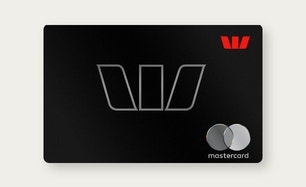
Find out more
Low rate card
I don’t think I’ll pay off my balance in full each month.
image
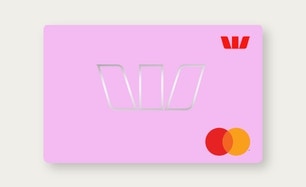
Find out more
Low fee card
I want to save on fees and plan to pay my balance off in full each month.
image
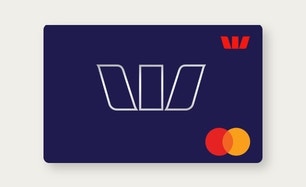
Find out more
Turning PartPay on
You'll need your account details handy if your Autopay payments will come from a non-Westpac account.
1. Turn on
Use the Westpac App, following the prompts, including setting up PartPay Autopay.
2. Add the PartPay Card to wallet
e.g. Apple Pay, Samsung Pay™, Google Pay™, Garmin Pay™ wallet for in-store shopping.
Shopping with PartPay
Once you’ve turned on PartPay, you can use it via your digital wallet for in-store shopping, or the Westpac App for online.
Using PartPay in-store
- Open your digital wallet - e.g. Apple Pay, Google Pay, Samsung Pay
- Select your PartPay Card - The one with the red strip
- Tap to pay - You’re done!
Using PartPay online
- Tap Cards in Westpac App - At bottom of your home screen
- Choose PartPay Card - From your available cards
- Generate dynamic CVC - For added online security
PartPay me up!
You’ll need the Westpac App (and an eligible credit card[#]) to use PartPay. If you don’t have the Westpac App, you can download it here.
Frequently asked questions
false
Is PartPay a Buy Now Pay Later (BNPL) product?
No, PartPay is not a Buy Now Pay Later (BNPL) product. PartPay is a payment feature that’s available on eligible Westpac credit cards. It’s similar to ‘Buy Now Pay Later’ services in that eligible purchases made on the PartPay Card are split into 4 payments over 6 weeks.
Unlike a standalone BNPL product, PartPay is part of an existing credit card account. For PartPay, if you miss a payment the amount will be moved to your linked credit card's Purchase balance, and you may be charged interest as a result. You aren’t charged a late payment fee for missing a PartPay payment, like some BNPL products.
Does my PartPay Card give me the same benefits as my linked credit card – like rewards points, or complimentary insurance?
Yes, as PartPay is a feature of your credit card account, you enjoy all the same benefits when you use your PartPay Card.
Does PartPay impact my interest-free days?
PartPay doesn’t impact the interest-free period you have on your linked credit card account.
If you miss a PartPay payment, that amount will be transferred to your linked credit card’s Purchase balance, and any interest-free days will be applied (or interest charged) as per the terms and conditions of your credit card account.
What’s the minimum purchase amount for PartPay?
There is a minimum purchase amount of $100, transactions under $100 will be declined.
Can I make my PartPay payments early?
Yes, you can make PartPay payments early. If there is a specific PartPay payment you want to make, you can do so via the Westpac App by going into your credit card Account, selecting Pay Card, and selecting PartPay payment. If you want to make a PartPay payment for any amount, you can do so by using BPAY®.
For either of the options above, your upcoming PartPay payments will be automatically adjusted via PartPay Autopay.
What’s the difference between PartPay and SmartPlan?
PartPay is a feature for eligible credit cards that splits an individual purchase of $100 or more into 4 payments over 6 weeks. You need to make the purchase using your PartPay Digital Card to take advantage. There is no establishment fee associated with PartPay.
SmartPlan is a payment option you choose after making a purchase. It needs to be set up separately, has an establishment fee and repayment options of 3, 6 and 12 months. You can use it to pay off an individual purchase of $200 or more, or a balance on your credit card.
grey
Any questions?
Find answers faster with our most popular FAQ topics.
icon
search-duo
search-outlined
Search FAQs
[BVAR#wbc-public-domain]/faq/partpay/
Things you should know
The Digital Card is only available in the Westpac App and supported with the latest version of the Westpac App. The terms and conditions applicable to your product also apply to the use of your Digital Card. Online Banking Terms & Conditions also apply. You may not always be able to access your Digital Card.
Read the Apple Pay Terms and Conditions before making a decision and consider if it is right for you. To use Apple Pay you will need an eligible card and a compatible device with a supported operating system. See our Apple Pay FAQs for more information. Apple, the Apple logo, Apple Pay, Apple Watch and iPhone are trademarks of Apple Inc., registered in the U.S. and other countries. App Store is a service mark of Apple Inc.
Read the Samsung Pay Terms and Conditions before making a decision and consider if it is right for you. Available for eligible cards. To use Samsung Pay you will need to use a compatible phone with a supported operating system.
Internet connection may be needed to make payments using Samsung Pay and normal mobile data charges apply.
Samsung and Samsung Pay are trademarks or registered trademarks of Samsung Electronics Co., Ltd.
Read the Google Pay Terms and Conditionsbefore making a decision and consider if it is right for you. Available for eligible cards. To use Google Pay you will need to use a compatible device with a supported operating system.
Internet connection may be needed to make purchases using Google Pay and normal mobile data charges apply.
Google Pay is a trademark of Google LLC.
Read the Garmin Pay Terms and Conditions before making a decision and consider if it is right for you. Available for eligible cards. To use Garmin Pay you will need to use a compatible device with a supported operating system.
Please be aware, to make a payment of over $200 with Garmin Pay, you must enter your physical card PIN at the contactless terminal. For security reasons, if you are not prompted for your card PIN, the transaction will not be accepted. This does not change current payments or transaction limits on your physical card.
Garmin, the Garmin logo, and the Garmin delta are trademarks of Garmin Ltd. or its subsidiaries and are registered in one or more countries, including the U.S. Garmin Pay is a trademark of Garmin Ltd. or its subsidiaries.
Please be aware, to make a payment of over $100 with Fitbit Pay, you must enter your physical card PIN at the contactless terminal. For security reasons, if you are not prompted for your card PIN, the transaction will not be accepted. This does not change current payments or transaction limits on your physical card.
Fitbit is a registered trademark(s) or trademark(s) of Fitbit LLC and/or its affiliates in the United States and other countries.
Mastercard® is a registered trademark, and the circles design is a trademark of Mastercard International Incorporated.
Registered to BPAY Pty Ltd ABN 69 079 137 518.
© Westpac Banking Corporation ABN 33 007 457 141 AFSL and Australian credit licence 233714.