
Looking to switch bank accounts to Westpac?
We've taken the stress out of switching bank accounts and transferring your regular incoming and outgoing payments from another bank¹ to Westpac.
Let’s help you get started
Switch accounts, easily transfer your salary, move all your payees and BPAY® billers, plus changeover any direct debits. Follow the steps below to find out how.


Step 2
Register for Online Banking and download the Westpac App.

Step 3
To switch your salary and import payees and billers online, you can choose to do it yourself, or with our help.
How do I switch bank accounts and import payees and billers?
Switching bank accounts and importing payees and billers is a straightforward process that can be done in just a few steps. You can do it yourself using Online Banking or the Westpac App, or we can help you ensure a smooth transition.
In Online Banking
- Go to Service > Services > Account services
- Select Get active on your account
- Select either Import payees and billers to import all your payees and billers or Email details to employer if you’d like to switch your salary
In the Westpac App
Before trying these instructions, make sure you update to the latest version of the app.
- Search Import payees and billers in the Smart Search bar and follow the prompts to import all your payees and billers
- When complete, either select Done or, if you’d like to switch your salary, select the Share your new account details link to email your employer
Tip 1: You can also Import your payees and billers or Share your new account details in Online Banking within 45 days of opening an account. Go to Overview > Your accounts and tap Banking set up progress > To do list.
Tip 2: If you just want to let your employer know the BSB and account number to pay your salary into, do it in the Westpac App. Select your account > tap the share icon > select the message app you want to use – email, SMS or messenger – add the address > tap send.
If your existing bank sends a list of recurring payments, ensure it is correct and current, including all BPAY and ‘Pay anyone’ payments.
How can I switch my existing direct debits and credits over to Westpac?
If you have existing direct debits and credits linked to another account, you can easily switch them over to your Westpac account. You can choose to manage this process on your own or, if you prefer, we’re here to assist you every step of the way.
Completing the process yourself
- Make a list of regular deposits and credits
Check your other bank statements and online banking for regular direct debits and credits, periodical payments such as rent or loan, BPAY or ‘Pay anyone’ payments on your old account. Alternatively, approach your other bank directly to ask for a List of Regular Payments (PDF 41KB).
- Review the list and update each provider separately
You'll need to contact each service provider directly for your regular direct credits or debits.
To set up periodic, BPAY or ‘Pay anyone’ payments simply Sign in to your Westpac Online Banking or the Westpac App and follow the prompts.
You might want to consider keeping your old account active for a few months to ensure all direct debits and credits have been successfully transferred. This may help avoid potential fees if you miss a payment.
When it does come time to close your old accounts, be sure to check the process your old bank requires, whether it's visiting a branch or providing notice in writing.
Completing the process with our help
- Request your regular payments list
To do this, complete a Request for a Regular Payments List (PDF 204KB) to obtain a ‘list of regular direct debits and credits’ and either drop it off at your nearest branch, or email to switchtowbc@westpac.com.au. If you require a regular payments list from multiple banks, please complete a separate Request for a Regular Payments List for each.
Once you submit the request form, we’ll contact your other bank. You should receive your Regular Payments List in approximately two weeks. The Regular Payments List may not contain regular BPAY or ‘Pay anyone’ payments. It only includes direct debits and credits. Check your other bank statements and online banking for payments not included on the requested list.
- Confirm the list and we’ll redirect your payments
Review and confirm the details on your list of regular direct debits and credits and add any BPAY or ‘Pay anyone’ payments. We’ll notify your service providers and redirect your regular payments. This can take up to 4 weeks, and some providers may require a Notice of Variation of Account Details (PDF 225KB) before the billing date.
If you have more than one service provider to be notified of the variation to your account details, complete a separate Schedule (page 2 of the Notice of Variation Account Details form) per provider.
Need to cancel a direct debit? You can complete a request through Online Banking or the Westpac App.
FAQS
It depends very much on your personal needs. Explore the bank account options available to you from everyday banking to savings accounts. To help you choose an account that fits use our handy account selector tool.
Simply decide which account you’d like to open and follow the prompts.
To open a Choice everyday transaction account with a debit card, you can open a new bank account in less than 3 minutes: Open now
You'll need to provide the update to your employer. To manually change the bank details for your pay, complete the form below and provide it to your boss or payroll team.

Westpac Protect™ Online Banking Security Guarantee2
If your Westpac account is compromised due to Online Banking fraud, we guarantee to repay any missing funds, provided you comply with our Online Banking Terms and Conditions.
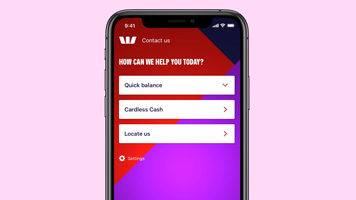
Contact us in the Westpac App. We're available 24/7
Sign into the app, tap ‘contact us’, skip the automated questions and talk to the right person, not a phone menu. We'll be ready to help you as soon as we receive the call.
Questions?
Find answers to some of the most frequently asked questions:


Things you should know
Import payee, Biller and Direct Debit Information Service - Terms and Conditions (PDF 146KB)
1. Selected banks include Commonwealth Bank, St George, BankSA, Bank of Melbourne, Bendigo Bank and ING.
Apple, the Apple logo and iPhone are trademarks of Apple Inc., registered in the U.S. and other countries. App Store is a service mark of Apple Inc.
Android, Google Play and the Google Play logo are trademarks of Google LLC.